
Radio asking for a code after a battery change?
Recover your Renault radio code in 3 minutes
Get Radio Code
A code retrieved by VIN is for the radio originally fitted to the car. If the radio has been replaced, read the details from the unit currently installed.
How to find the vehicle VIN
The VIN is your vehicle’s 17-character identification number. Choose a location to see an example.
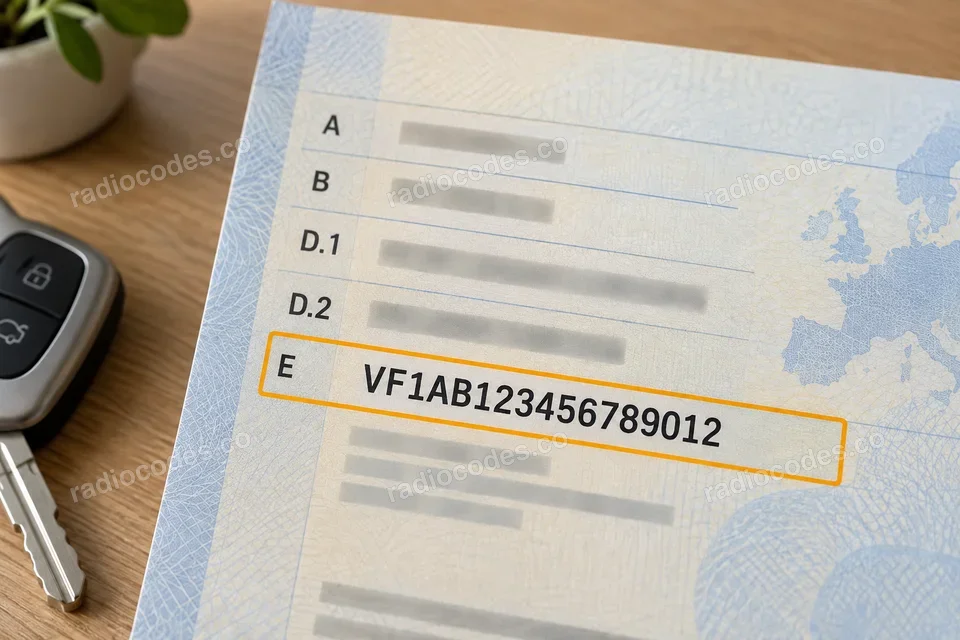
Number in the selected photo:
VF1AB123456789012
Clearest number
Registration document
Start with your vehicle registration document — the VIN is clear and easy to read.
Door pillar
Open a front door and check the sticker or plate on the pillar. Depending on the model, it may be on the driver’s or passenger’s side.
Windscreen
Look from outside along the bottom edge of the windscreen. Find the small window showing the VIN on the dashboard.
Under the bonnet
Open the bonnet and look for the VIN stamped into the metal bodywork, for example near a suspension strut tower. Use the chassis number, not the engine number.
VIN locations vary by model and year. The illustrations show example locations.
Where can I find my Renault radio number?
Choose the method that matches your radio. If it is the original factory-fitted unit, you can also use your vehicle's VIN.
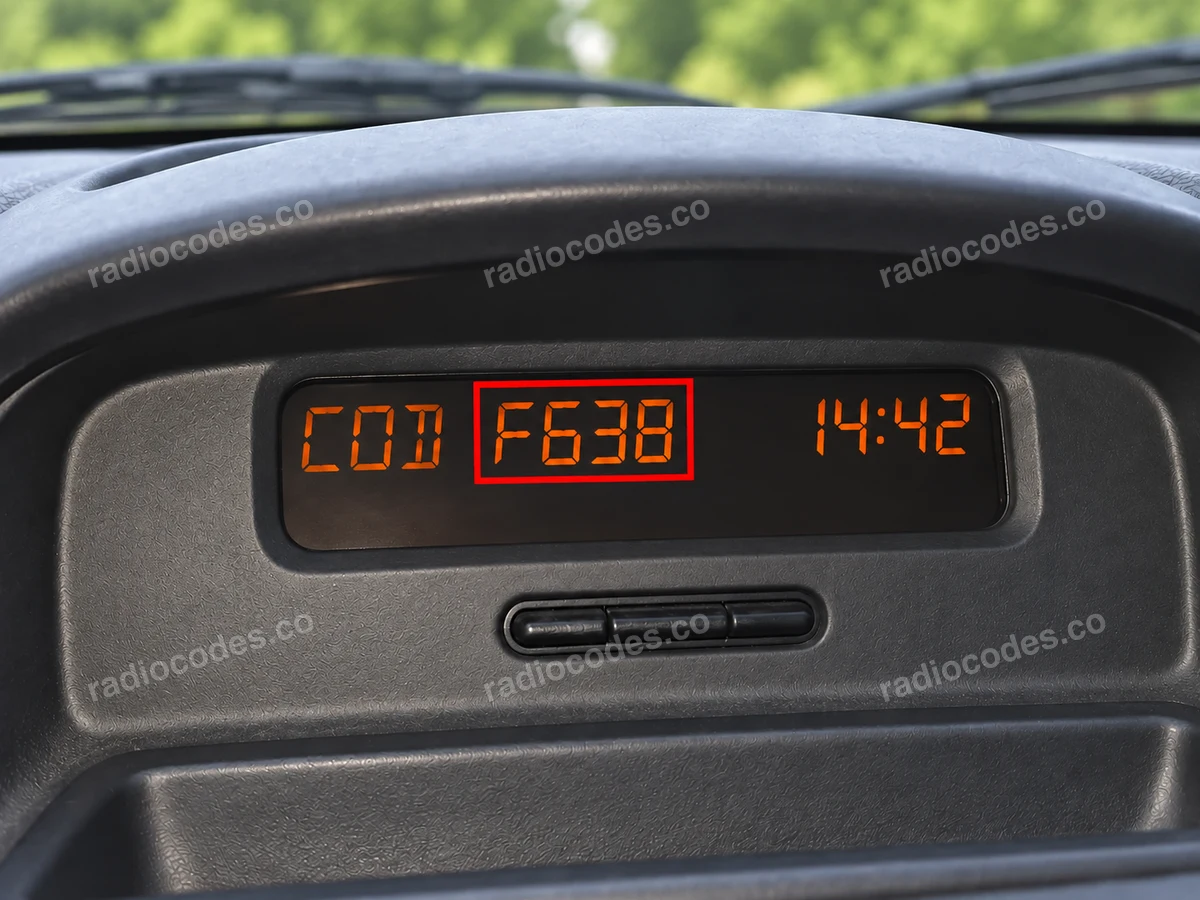
Number in the selected photo:
F638
Find the precode using buttons 1 and 6
- Switch on the ignition and the radio. On older radios that support this method, press and hold 1 and 6 together for a few seconds.
- Check the radio screen or the separate dashboard display. If you see one letter and three digits, such as F638, write down all four characters. This is the precode you need for the form.
- If the screen still shows CODE or 0000 after you hold the buttons, read the number from the label on the radio casing. If the radio is the original factory-fitted unit, you can use the vehicle's VIN instead.
CODE or 0000 means the radio is waiting for you to enter its code. The precode you need has a different format: one letter and three digits, such as F638. Not every radio can display it using buttons 1 and 6.
Media Nav / Media Nav Evolution
- If the screen shows Authentication key, Code authentication or a request for a code, the unit needs its four-digit radio code.
- For the original factory-fitted radio, select VIN (no radio removal) in the form and copy all 17 characters from your vehicle documents or the vehicle itself.
- If the radio has been replaced, read the full number from the label on its casing. In the example shown, this is 281155911RTJ682; the final J682 is the precode. Select Radio serial number in the form.
The part number alone, such as 281155911R, is not enough. Copy the complete number next to the barcode, including the letter and three digits at the end.
Label on the radio casing
- Look for the label on the top, side or rear of the radio. If it is hidden, the unit needs to be slid out. Radios with four release holes require suitable removal keys; other versions need the trim removed and the mounting screws undone. The method depends on the model. A workshop can help you access the label.
- Look for a field marked Security, Precode or Code. A short precode consists of one letter and three digits, such as Z639. It may also follow T0, as in T0F312.
- If the number next to the barcode starts with 2811, 8200 or 7700, copy it in full, including the letter and three digits at the end. The part number in the Part Code field alone is not enough.
- For a Blaupunkt radio, read the full number beginning with BP. On supported Delphi radios, the number starts with 89 followed by five letters and nine digits. Enter these numbers in full; do not shorten them to four characters.
If your label has a different format or the form does not recognise the number, send us a photo of the radio and its complete label. We will help you identify the details needed.
Copy the details from your own radio, including every letter and zero. The numbers in the photos are examples only.
Renault radio codes — questions and answers
The code will be provided immediately after placing the order, regardless of the time of day.
Yes. For a supported vehicle with its original factory-fitted radio, you can use the 17-character VIN. Find it in your registration document, at the bottom of the windscreen or on the vehicle identification plate. Select the VIN (no radio removal) tab. If your VIN is not recognised, use the radio's details or contact us.
Not always. First check whether you can read the number on screen or use the VIN for the original radio. To reach the label, you will usually need to slide the unit out. Older panels with four release holes require removal keys; integrated systems often need the trim and mounting screws removed. Slide the unit out only far enough to read the label, without pulling on the wiring. If you are unsure how it is secured, ask a workshop to read the label for you.
These radios are found in vehicles including the Renault Clio, Mégane, Scénic, Laguna, Twingo, Modus, Espace, Captur, Kadjar, Kangoo and ZOE, and the Dacia Duster, Sandero, Logan, Dokker and Lodgy. The same car model can have different radios depending on its year, market and specification. Choose the instructions by the radio's appearance and markings; the car's model name alone does not confirm that a particular unit is supported.
Compare the number in your order with the vehicle's VIN or the number on the radio label, check all four digits of the code and make sure you are confirming it correctly. For a VIN order, check whether the radio is the original unit. If the problem continues, contact us with your order number and photos of the radio, its message and any accessible label. We will help you find the cause.
The code stays the same for the same radio. Keep it with your vehicle documents. If the unit is replaced, the previous code may no longer work, even though the car and VIN have not changed.
The VIN identifies the equipment originally fitted to the vehicle. If the radio has been replaced, a code retrieved by VIN may belong to the previous unit. Read the precode or serial number of the radio currently installed and select the Radio serial number tab.
Many factory-fitted radios ask for their security code after losing power. This can happen when the battery is replaced or goes flat, when the radio is removed, or when its power supply is interrupted. Enter the code assigned to that unit to use the radio again.
A precode is a short identifier, usually one letter and three digits, such as F638. It can form part of a longer number on the label. A serial number identifies the radio and its format varies by manufacturer. The code you enter on the radio consists of four digits. Do not enter the precode in the radio's code entry screen.
Enter the precode, such as Z639, or the full longer number including its final characters, such as 281155911RTJ682. For Blaupunkt, use the complete number starting with BP; for a supported Delphi unit, use the complete number starting with 89 with all its letters and digits. The Part Code, model name or approval marking alone is not enough. If you are unsure, send us a photo of the full label before ordering.
Switch on the ignition and radio, then hold 1 and 6 together for a few seconds. On older radios that support this function, the precode appears on the radio screen or separate dashboard display. Write down the letter and all three digits. If the screen still shows CODE or 0000, the radio is waiting for its code — this is not a precode. Read the number from the radio label instead, or use the VIN if the radio is the original factory-fitted unit. Buttons 1 and 6 do not reveal the number on every model.
On Media Nav and Media Nav Evolution, this is a request for the four-digit radio code. In Spanish, the message may read Clave de autenticación. Use the VIN for the original factory-fitted unit; if the radio has been replaced, use the details on its casing. This is not a Bluetooth PIN, an account password or a serial number displayed on screen.
On a typical radio with station preset buttons, press 1 repeatedly to set the first digit. Use 2, 3 and 4 to set the remaining digits, then press and hold 6 to confirm the complete code. Include any leading zero. On Media Nav, enter all four digits using the touchscreen keypad and tap OK. Some older radios use different controls; the stalk and rotary-knob methods are explained below.
On older radios that support this method, wait for CODE followed by 0000. Turn the thumbwheel on the remote to set the first digit, then press the ¬ confirmation button to move to the next. Repeat for all four digits. With the complete code displayed, hold ¬ until you hear a beep. If your remote has different controls, check the instructions for that radio. Some older units using preset buttons require you to hold 5 instead of 6 to confirm.
On this version, turn the central rotary knob to select the first digit, then press the right-hand > tuning button to move to the next. Set all four digits in this way, then press the central knob to confirm the complete code. This procedure applies to units with that message and those controls; it is not universal to all radios with a rotary knob.
After an incorrect code, the radio may temporarily block further attempts. Wait until it lets you enter the code again. The Plug & Radio manual specifies a wait of around 60 seconds after the first incorrect attempt, with each further error doubling the wait. Other radios may have different waiting periods. You can check the details needed for your order while you wait; the lockout only affects code entry on the radio.