
Radio asking for a code after a battery change?
Recover your Becker radio code in 3 minutes
Get Radio Code
Example radio identifiers: Becker
Compare the format of your number. Enter the details from your own radio in the form, not these examples. Where can I find my radio’s serial number?
Letters and digits
2210AH0W1507123
2045BC058153123
6045AR058153476
1 letter + 7 digits
W1507123
Becker radio model: BE 2210
T
T00BE174690622
T0012010272666
8 digits
58153123
Becker radio model: BE 2045
BE
BE604558153476
How to find your Becker radio number
Choose a similar radio. The front helps you recognise it; the number on the casing identifies its version.
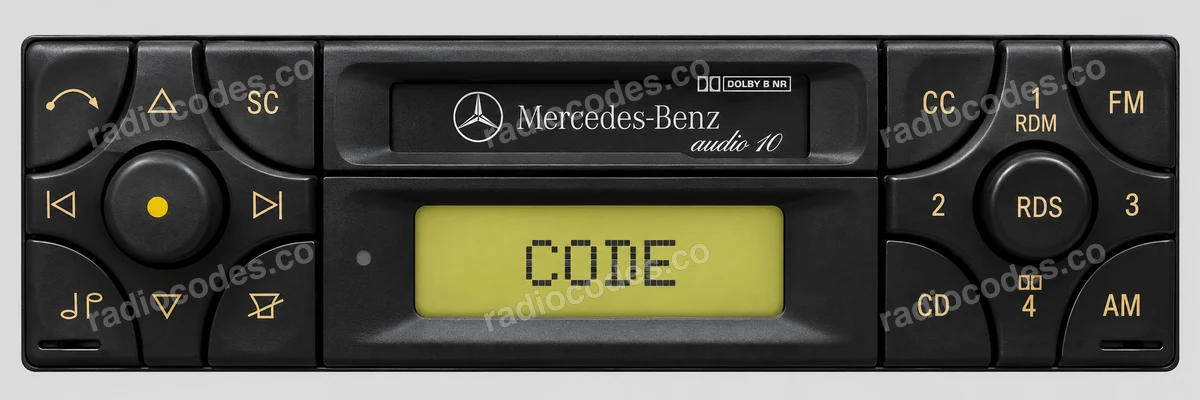
Becker · BE
- Slide the radio out of the dashboard. Check the label and engraving on the casing, on the side or top.
- Find Serial-No. and Model-No.. The serial may have 8 characters; the model is BE followed by 4 digits.
- After entering a short serial, add the BE model. You can also enter the full number below the barcode or the engraving starting with BE; it already includes the model.
Keep any letter at the start of the short serial. The BE model is not the serial number.
How do I enter the code?
Audio 10 BE3100 cassette: set a digit using the up or down arrow beside the left knob. Confirm it with the left arrow. When the next position flashes, set the next digit. Repeat for the whole code.
Traffic Pro BE4765/BE4775: at Enter Code Number, enter the 5 digits using the buttons below the screen. The radio accepts the code after the last digit.
Audio 10 CD with a right-hand rotary control: turn it to choose a digit, then press briefly to confirm it. After setting the full code, hold the control for about 3 seconds. The cassette panel uses different buttons.
Becker / Harman
- Slide the radio out of the dashboard. Check the label and engraving on the casing, on the side or top.
- Copy the full number below the barcode or the serial starting with T00BE or T0012. Keep every letter and digit.
- After entering a short serial, add the BE model. You can also enter the full number below the barcode or the engraving starting with BE; it already includes the model.
Other Harman versions have separate procedures. For a touchscreen radio, also check the guide for your vehicle brand.
How do I enter the code?
Follow the instructions for your exact model. The button-operated Becker RB3 and touchscreen Uconnect do not use the same code-entry procedure.
How do I slide the radio out?
Switch off the radio and ignition. Use removal keys that fit the slots in the panel. If the radio is screwed in, follow the vehicle manual to remove the trim and undo the screws. Slide it out just far enough to read the label or engraving. Do not pull on the wires.
Becker radio code: questions and answers
How it works
Recover the code for your Becker radio in three simple steps.
Prepare your radio details
Follow the guide for your radio to find the serial number, VIN or other details requested in the form.
Order your radio code
Enter the required details and your email address. Check your information, then pay securely online.
Receive your code by email
Your code arrives in your inbox. Follow the instructions for your radio to use it and get your music back.