
Nissan Qashqai radio code
Get your original Nissan Qashqai radio code online in 3 minutes. Receive your code by email — no dealer visit required.
Example radio identifiers: Nissan
Compare the format of your number. Enter the details from your own radio in the form, not these examples. Where can I find my radio’s serial number?
Nissan Connect
7452451
Part / device / model number: 7612830XXX
Date: 13.01.28
Daewoo
DW22N1852E
Part / device / model number: 28185 1KA2A
Date: 13.01.23
Daewoo
DW54N0988901BH30D
Part / device / model number: 28185BH30D
Date: 05.21.2015
Daewoo
DS07N10739291KA2A
Part / device / model number: 281851KA2A
Date: 01.29.2010
Clarion
CL0943 A 0020752
Part / device / model number: PN-2424M
Clarion
PN3001P A 0011766
Part / device / model number: PN-3001P
Blaupunkt
BP723346696293
Visteon · SEED
230147
Visteon · SEED
645643
Visteon · M
M117844
Visteon
42VAH9C0068
Part / device / model number: 281854KJ1B
Visteon
30CAL6T0081
Part / device / model number: 281856WX0A
Renault
S167
Renault
8200057681TJ823
Renault
281155248RTK123
Renault
7700434427TR107
Before you order
Which radio is in your Nissan?
Choose the radio that looks like yours to see how to find the details needed to order your code.
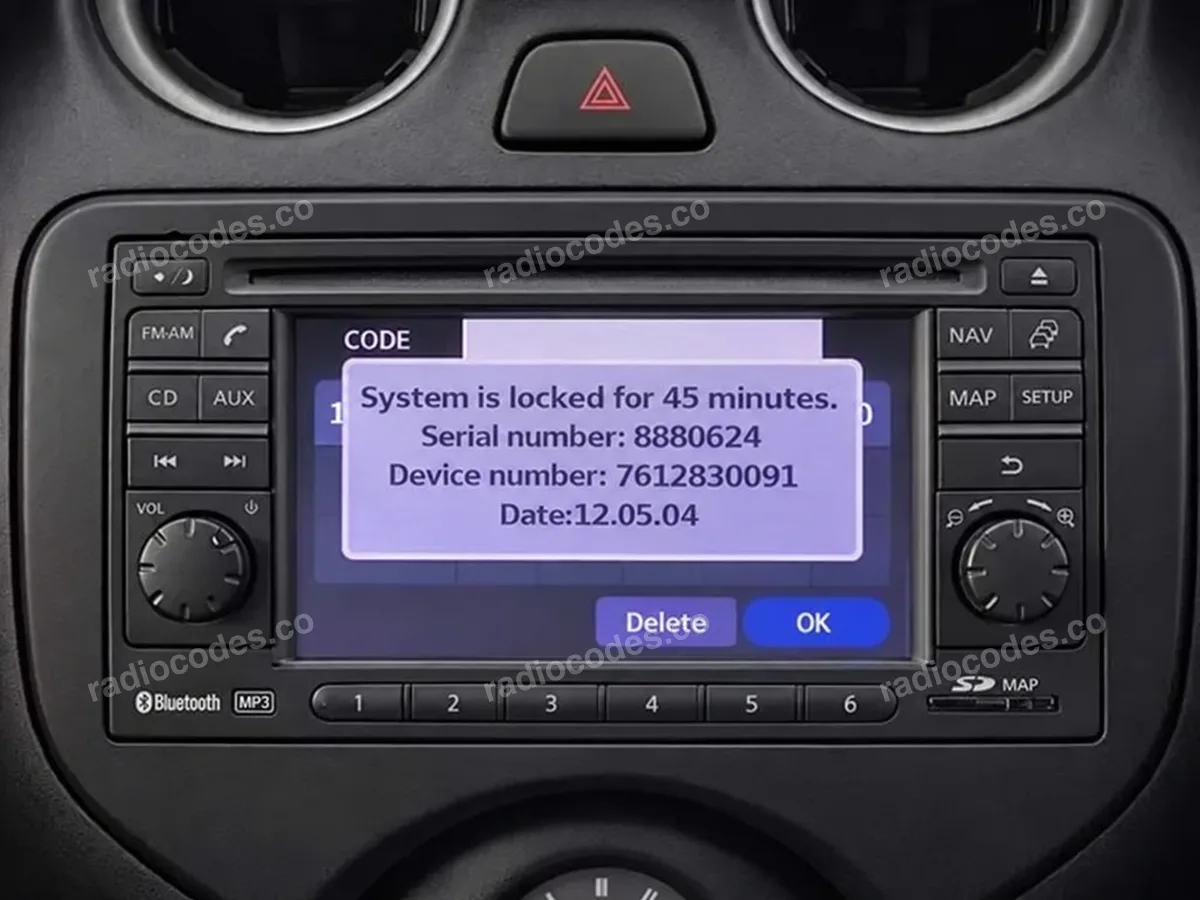
Nissan Connect screen
What to copy
Serial number, Device number and Date from the screen.
Nissan Connect
Use these steps for a touchscreen Nissan Connect that looks like the photo and asks for a PIN.
Example details
- Serial number
8880624- Device number
7612830091- Date
12.05.04
How to find the details
- Switch on the ignition (ACC) and radio. If it asks for a code, enter any incorrect 4-digit code and confirm it. Do this 3 times in total. The screen will show the radio details and a waiting time.
- Take a screen photo and copy Serial number, Device number and Date. The serial must come from the screen, not the casing label. If the details were already visible, skip the first step.
- If the device number is cut off (for example 761283…), read the full number from the casing label. You will need to remove the radio from the dashboard to see it.
Frequently asked questions
Check the label on the radio casing. Read the complete serial number and the other details requested in the form, keeping every letter and zero. Compare them with the guide examples. If the radio asks to be paired with the car or needs a navigation card instead of a PIN, it needs a different solution.
On the pictured Connect, Daewoo and Visteon versions with a Serial/Part screen, enter and confirm an incorrect code 3 times to display the details. If they are already visible, just copy them. For Visteon with SEED, use the SETUP + BACK method above.
On a touchscreen, enter the code you received and confirm it. On many radios with preset buttons, buttons 1–4 set each digit and 6 or MENU/ENTER confirms the code. Check your radio manual for the correct confirmation button.
You can copy the details and order now. Wait until the countdown ends before entering your code — sometimes this takes 60 minutes. Check the manual to see if the radio must stay on. If it still won't accept a code, contact a workshop.
Quick facts for Nissan Qashqai owners
Instantly
Clarion, Daewoo, Bosch/Blaupunkt, Visteon, Panasonic, and Hitachi
Connect, Connect 2, Connect 3, LCN, Bose Personal, and Carwings
2006-2023
Before ordering a Nissan Qashqai radio code
Required information
For a Nissan Qashqai, prepare the radio serial number, part number, VIN, or a clear label photo if the form asks for it. Serial numbers often look like BP723346696293, M117844, CL0943 A 0020752, PN3001P A 0011766, DW22N1852E, and DW54N0988901BH30D.
What helps us find the right code
You can still order a code if your Nissan Qashqai radio has been replaced, has unusual markings or a hard-to-read label, or shows a lockout message. Clear photos and accurate details help us find the right code for you.
Why a code may fail
The most common causes are an incorrect serial number, a mismatched VIN, entering the code during a temporary lockout, or using it on a different radio from the one listed in your order.
Fast delivery and help with your code
We deliver codes for supported radio models instantly. If your code doesn't work on the radio listed in your order, report the issue using the form. We'll check the details and help you work out what's wrong.
Example serial numbers
Typical serial numbers you may see on a Nissan Qashqai radio:
- BP723346696293
- M117844
- CL0943 A 0020752
- PN3001P A 0011766
- DW22N1852E
- DW54N0988901BH30D
How it works
Follow these steps to get the radio code for your Nissan Qashqai without visiting a dealer or workshop.
- 📸
Find the serial number
Remove the radio or open the diagnostic menu to note the serial number (look for numbers such as BP723346696293, M117844, CL0943 A 0020752, PN3001P A 0011766, DW22N1852E, and DW54N0988901BH30D). Clear photos help us validate it.
- 🧾
Order your Nissan code
Enter your radio details and the email address where you'd like to receive your code.
- 🔓
Receive and enter the code
You'll receive your code by email. Enter it into your radio and get back to enjoying music on the road.
Nissan Qashqai radio code FAQ
Where can I find the serial number on a Nissan Qashqai radio?
Check the label on the side or top of the radio, or open the service menu on its screen. Example serial numbers for Nissan Qashqai radios: BP723346696293, M117844, CL0943 A 0020752, PN3001P A 0011766, DW22N1852E, and DW54N0988901BH30D. Take a clear photo of the serial number before ordering so we can check it.
How fast can you send the radio code?
We confirm the exact turnaround once we verify the serial number. In most cases the code is delivered instantly after payment, and we keep you posted if manual processing is required.
Will the code still work after a battery disconnect?
Yes. The PIN we deliver stays linked to your Nissan Qashqai radio. You can reuse it whenever the battery is disconnected or the ECU is serviced.
Can I get a radio code without the serial number?
The order form will show you which details you need. Depending on your radio model, this could be a serial number from the screen, a photo of the label, a part number, the VIN, or another detail requested in the form.
What does a Nissan Qashqai radio code look like?
Most factory stereos use a 4-digit numeric PIN, while premium navigation or amplified systems may require 5 digits or include letters. Your email will include the code and its format.
Nissan radio models by part number
Find your exact Nissan radio model or part number to see its serial number format and get the radio code.