
Volkswagen Passat radio code
Get your original Volkswagen Passat radio code online in 3 minutes. Receive your code by email — no dealer visit required.
Get Radio Code
Example radio identifiers: Volkswagen
Compare the format of your number. Enter the details from your own radio in the form, not these examples. Where can I find my radio’s serial number?
VWZ
VWZ1Z2K8198892
VWZ
VWZ4Z7K1130097
VWZ
VWZ1Z2I6576334
RCD 300 · Grundig
VWZ2Z2F1394291
RCD 310 · Delphi
VWZ4Z2K1310391
RCD 200
VWZ4Z4H3300242
RNS 510 · Continental
VWZ6Z7L0386195
How to find your Volkswagen radio serial number
Choose the radio that looks like yours. See where to find its serial number and what to enter in the form.
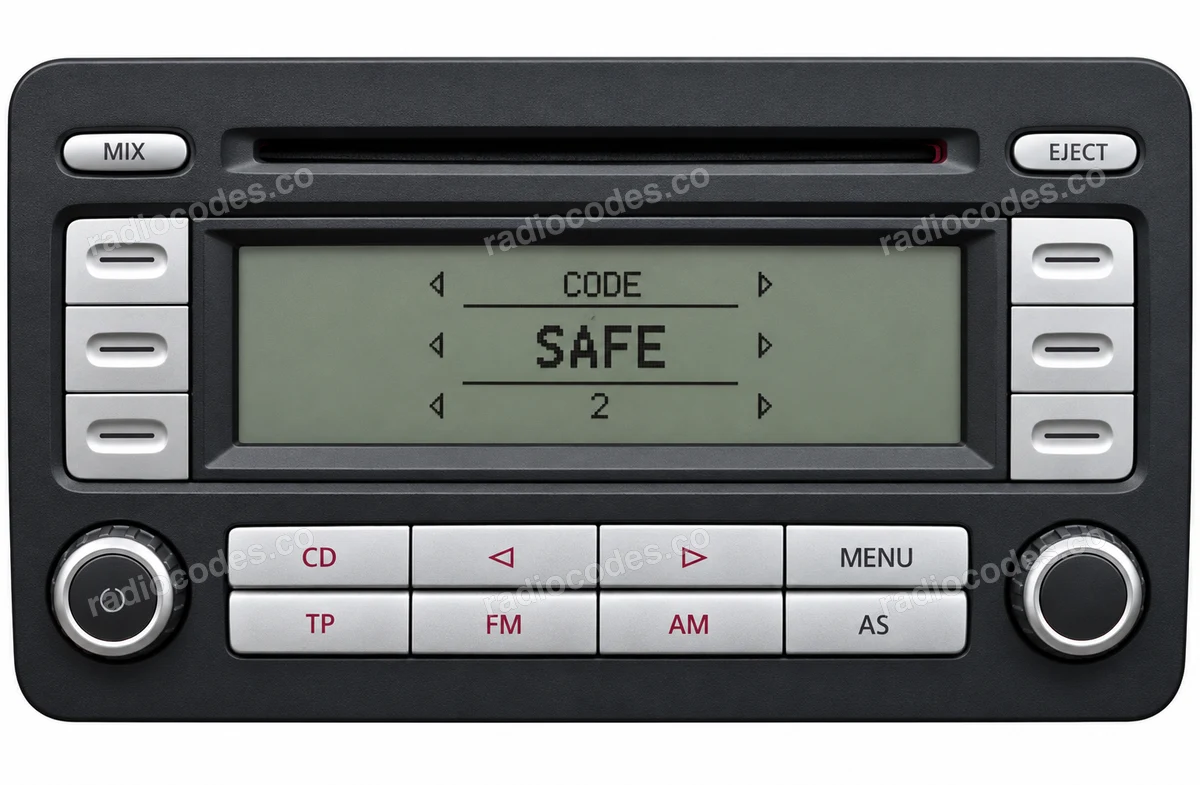
RCD 300
This photo helps you recognise the radio. Select a label thumbnail to see where to find its serial number.
RCD 200 / 210 / 300 / 310 / 500 / 510
- Switch off the radio and ignition. Depending on the mounting, use the correct radio removal keys, or remove the trim and undo the retaining screws. Slide the unit out far enough to see its label.
- Check the top, sides and back of the casing. Look for the number starting with VWZ, printed on the label or stamped into the metal. Take a clear photo of the entire label.
- Enter the complete serial number in the form. Keep every letter and zero, including a zero at the start of the numeric section. Compare your entry with the label before continuing.
The front photo shows an RCD 300. RCD 200, 210, 310, 500 and 510 units have different panels. A part number such as 1K0 035 186 AA does not replace the VWZ serial.
How do I enter the code?
On the RCD 300, “SAFE” changes to “1000” after you switch on the radio. Set the four digits using the buttons beside their positions on the display. Press each button until the correct digit appears. Check the complete code and press the button next to ENTER. Other RCD versions have their own instructions; on the RCD 510 with an on-screen keypad, enter the digits on the touchscreen and press OK.
RNS 310 / 315 / 510 · MFD / MFD2
- Switch off the radio and ignition. Depending on the mounting, use the correct radio removal keys, or remove the trim and undo the retaining screws. Slide the unit out far enough to see its label.
- Check the top, sides and back of the casing. Look for the number starting with VWZ, printed on the label or stamped into the metal. Take a clear photo of the entire label.
- Enter the complete serial number in the form. Keep every letter and zero, including a zero at the start of the numeric section. Compare your entry with the label before continuing.
On navigation labels, the barcode text may have an extra 014 prefix and a trailing character. Look for the separately printed 13-character VWZ serial as well. Do not confuse it with the large part number.
How do I enter the code?
If your radio displays a touchscreen code keypad, enter the four digits and press OK. On versions operated by a rotary control, select and confirm the digits using that control. This does not apply to a component protection message or to every older front panel.
A typical VWZ serial has 13 characters. It identifies the radio, and is different from the vehicle VIN, part number and 4-digit code.
Have a different radio?
Beta / Gamma, or a radio that is not pictured? Find the serial number on its label or stamped into the casing. Enter it in full in the form, including every letter and zero. A “Component protection” message needs diagnosis, rather than a standard radio PIN.
Volkswagen radio code questions
Quick facts for Volkswagen Passat owners
Instantly
Bosch, Delphi, Continental, Panasonic, Harman, and Technisat
RCD 210, RCD 310, RCD 510, RNS 315, RNS 510, Composition Media, Discover Media, and Discover Pro
2000-2023
Before ordering a Volkswagen Passat radio code
Required information
For a Volkswagen Passat, prepare the radio serial number, part number, VIN, or a clear label photo if the form asks for it. Serial numbers often look like VWZ1Z2K8198892, VWZ4Z7K1130097, and VWZ1Z2I6576334.
What helps us find the right code
You can still order a code if your Volkswagen Passat radio has been replaced, has unusual markings or a hard-to-read label, or shows a lockout message. Clear photos and accurate details help us find the right code for you.
Why a code may fail
The most common causes are an incorrect serial number, a mismatched VIN, entering the code during a temporary lockout, or using it on a different radio from the one listed in your order.
Fast delivery and help with your code
We deliver codes for supported radio models instantly. If your code doesn't work on the radio listed in your order, report the issue using the form. We'll check the details and help you work out what's wrong.
How it works
Follow these steps to get the radio code for your Volkswagen Passat without visiting a dealer or workshop.
- 📸
Find the serial number
Remove the radio or open the diagnostic menu to note the serial number (look for numbers such as VWZ1Z2K8198892, VWZ4Z7K1130097, and VWZ1Z2I6576334). Clear photos help us validate it.
- 🧾
Order your Volkswagen code
Enter your radio details and the email address where you'd like to receive your code.
- 🔓
Receive and enter the code
You'll receive your code by email. Enter it into your radio and get back to enjoying music on the road.