
Radio asking for a code after a battery change?
Recover your Ford radio code in 3 minutes
Get Radio Code
Example radio identifiers: Ford
Compare the format of your number. Enter the details from your own radio in the form, not these examples. Where can I find my radio’s serial number?
M
M328991
V
V209030
TravelPilot · C7
C7E3A022418236714
Blaupunkt · BP
BP052677003905
FDC
FDC2005M066358
Sony · S0CD / SOCD
S0CD1X9V059073
FIC · 3AA
3AA952944
L
L029141
C
C039873
12 digits
123456789012
Top Power · 9123T
9123T123456
Top Power · SQSV
SQSVACQ112029123X021322
Figo / Visteon · VC
VC0AKZ86472915
Figo / Visteon
FIB638291
Visteon (4 letters + 6 digits)
MDHA726391
Find your radio’s serial number
Choose the radio that looks like yours. We’ll show you where to find the number you need to order your code.
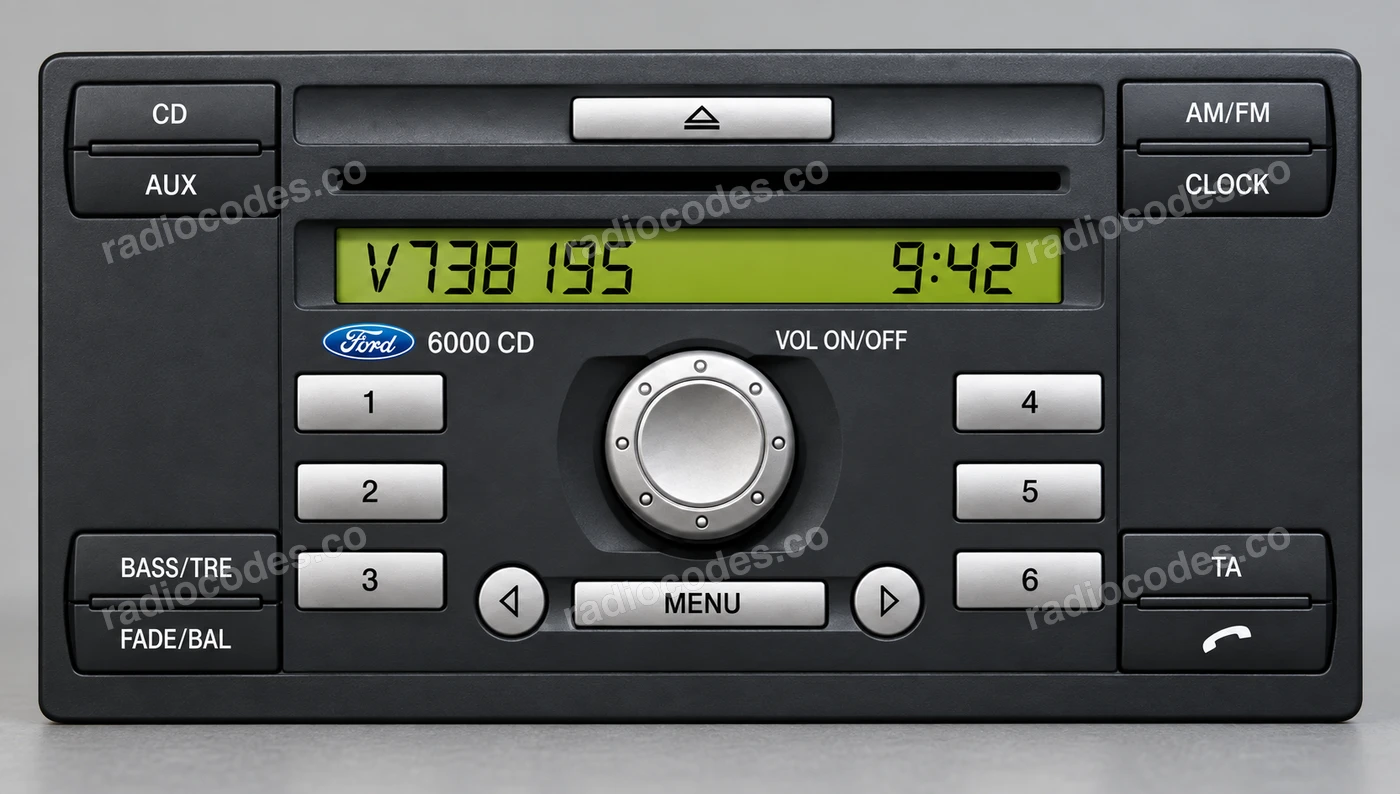
The radio and label may look different depending on the version.
Serial number in this photo
V738195
6000CD
- Switch the radio on. Hold buttons 1 and 6 together for a few seconds.
- Wait while the display cycles through the information screens. Look for a number starting with V or M followed by 6 digits.
- Write down the full number. If it appears in two parts, join them in the order shown.
No serial number? Try holding buttons 2 and 6. Older 6000CD / RDS EON versions may need to be removed so you can read the label on the casing. See the photos.
6000CD
- Switch the radio on. Hold buttons 1 and 6 together for a few seconds.
- Wait while the display cycles through the information screens. Look for a number starting with V or M followed by 6 digits.
- Write down the full number. If it appears in two parts, join them in the order shown.
No serial number? Try holding buttons 2 and 6. Older 6000CD / RDS EON versions may need to be removed so you can read the label on the casing. See the photos.
4500 RDS
- Switch the radio on. When the display shows CODE, hold buttons 2 and 6 together for about 3 seconds.
- Look for the letter M followed by 6 digits on the display.
- Write down the full number, including the M. If it does not appear on screen, read it from the label on the radio casing.
Sony
- This radio’s serial number is on a label on the casing. You’ll need to slide the radio out of the dashboard to see it.
- Find the field marked SERIAL NO. or S/N. On the Sony model shown, the number is M followed by 6 digits.
- Write down the whole number, including the M and every zero. If the label is hard to read or you’re unsure which number to use, send us a photo of it.
Sony CD132
- Switch the radio on. Hold buttons 1 and 6 together for a few seconds, then wait while the information screens cycle through.
- Look for V or M followed by 6 digits. A V number may appear at the end of a longer string, as shown in the photo.
- Write down the full number shown. If it appears in two parts, join them in the order displayed.
No serial number on the display? Slide the radio out and read the label on its casing. Look for SERIAL NO. or S/N; there’s an example in the gallery.
TravelPilot
- On TravelPilot radios, the serial number is on a label on the casing. You’ll need to slide the radio out of the dashboard to see it.
- Find the full number starting with BP or C7. It may also be stamped into the metal beside the label.
- Copy every letter and digit, even if the number is printed with spaces. Use the photos to help you identify it.
The part number, such as 7 612 300 526, is different from the serial number. Enter the BP or C7 number in the form.
Figo / Visteon
- Look for the label on the radio casing, on the side, back or top. You’ll need to slide the unit out of the dashboard to see it.
- Find the number below the barcode, sometimes between stars. It can contain different combinations of letters and digits. It does not have to start with the same letters as our examples.
- Copy the whole number, including every letter and zero. Don’t confuse it with a part number such as AS69-18C939-AJ. On some labels, this is the large text below the serial number.
If your radio is from the Brazilian market, or the form does not recognise its number, send us photos of the whole label and radio front before ordering.
Other radios
- Check the label on the radio casing. On older models such as the 3000 Traffic, and on FIC radios, you’ll usually need to slide the unit out to read it.
- Look for SERIAL NO., S/N or a number like the one in the photo. Older radios may have M, L or C followed by 6 digits.
- Write down the full number, including all letters and zeros. If your label looks different or you’re unsure which number to use, send us a photo.
Copy your own radio’s number, including every letter and zero. This is different from the radio code you’ll receive after ordering.
Ford radio code questions
On many 6000CD and Sony radios, hold buttons 1 and 6 to display the number. On a 4500 RDS, use 2 and 6. Some versions cannot show it on screen, so you’ll need the label on the casing. Choose your radio in the guide above for the right steps and photos.
This guide covers different radios found in the Focus, Fiesta, Transit, Mondeo, Galaxy, Kuga, Ka, S-Max, C-Max, Ranger, Fusion, Figo, B-Max, Escort, Puma, Tourneo, EcoSport, Edge. Match the radio’s appearance and markings, as the same car model can have different units. Examples include the 3000 Traffic, 4500 RDS, 6000CD, Sony, Sony CD132, TravelPilot and Visteon. We check code availability using the individual radio’s number; a model appearing in this guide does not mean every version is supported.
Compare what you entered with the label or display. Check every letter, digit and leading zero, and make sure you haven’t used the part number. If the number still isn’t recognised, send us photos of the entire label and the radio’s front panel. We’ll check whether we can help before you order.
Check that the serial number on your order came from this radio and was copied in full. Then check the code’s digits and the confirmation button against your radio’s instructions. If the code still does not work, contact us with your order number and photos of the label and the message on screen. This lets us check the details and work out the next step.
Our form needs the radio’s serial number. The VIN identifies the vehicle, but the radio may have been replaced. Taking the number from the unit currently fitted ensures we identify the radio you need a code for. The part number, often marked PART NO., is not a substitute for the serial number either.
Many factory-fitted Ford radios need their radio security code entered again after losing power. This can happen when the battery is replaced or goes flat, or when the radio is removed. A CODE or ENTER KEYCODE message does not, by itself, mean the radio is faulty.
The label is usually on the top or side of the casing. Depending on the model, you’ll need radio removal keys or you’ll need to remove the trim and undo the screws. Use the method for your particular radio. A local garage can help if you don’t have the right tools.
Get radio removal tools- Switch the radio on and wait for CODE or ENTER KEYCODE. Press button 1 repeatedly until the first digit of your code appears.
- Use buttons 2, 3 and 4 to set the remaining digits in order. If you go past the right digit, keep pressing the same button until it comes round again.
- Check all 4 digits, then press button 5 to confirm.

On a 6000CD or Sony with a 0–9 keypad, enter the code’s digits directly, then confirm with * or the centre button between the arrows, depending on the version. On a touchscreen, enter the code and use the on-screen confirmation button. If your radio has a different button layout, check its model’s instructions.
Let the countdown finish, keeping the radio switched on as directed in its manual. Once the code entry screen returns, enter the code you received. If the message stays on or you see a different message, send us a photo of the screen.
This can mean the radio has reached its limit for code-entry attempts. Receiving the correct code may not be enough at this stage. Check your radio’s manual or contact a Ford dealer. If you’re unsure what the message means, send us a photo of the screen before ordering. It should not be treated as an ordinary WAIT countdown.