
Radio asking for a code after a battery change?
Recover your Nissan radio code in 3 minutes
Example radio identifiers: Nissan
Compare the format of your number. Enter the details from your own radio in the form, not these examples. Where can I find my radio’s serial number?
Nissan Connect
7452451
Part / device / model number: 7612830XXX
Date: 13.01.28
Daewoo
DW22N1852E
Part / device / model number: 28185 1KA2A
Date: 13.01.23
Daewoo
DW54N0988901BH30D
Part / device / model number: 28185BH30D
Date: 05.21.2015
Daewoo
DS07N10739291KA2A
Part / device / model number: 281851KA2A
Date: 01.29.2010
Clarion
CL0943 A 0020752
Part / device / model number: PN-2424M
Clarion
PN3001P A 0011766
Part / device / model number: PN-3001P
Blaupunkt
BP723346696293
Visteon · SEED
230147
Visteon · SEED
645643
Visteon · M
M117844
Visteon
42VAH9C0068
Part / device / model number: 281854KJ1B
Visteon
30CAL6T0081
Part / device / model number: 281856WX0A
Renault
S167
Renault
8200057681TJ823
Renault
281155248RTK123
Renault
7700434427TR107
Before you order
Which radio is in your Nissan?
Choose the radio that looks like yours to see how to find the details needed to order your code.
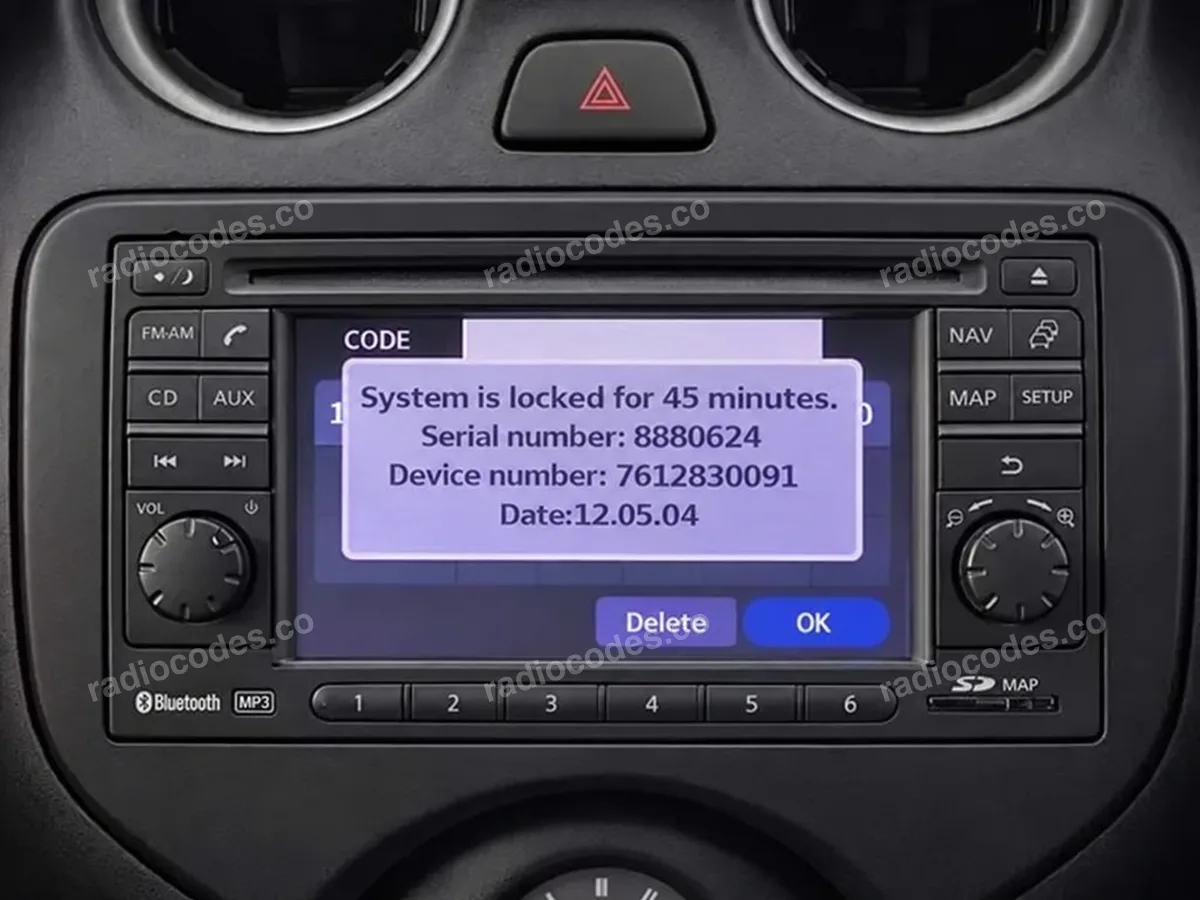
Nissan Connect screen
What to copy
Serial number, Device number and Date from the screen.
Nissan Connect
Use these steps for a touchscreen Nissan Connect that looks like the photo and asks for a PIN.
Example details
- Serial number
8880624- Device number
7612830091- Date
12.05.04
How to find the details
- Switch on the ignition (ACC) and radio. If it asks for a code, enter any incorrect 4-digit code and confirm it. Do this 3 times in total. The screen will show the radio details and a waiting time.
- Take a screen photo and copy Serial number, Device number and Date. The serial must come from the screen, not the casing label. If the details were already visible, skip the first step.
- If the device number is cut off (for example 761283…), read the full number from the casing label. You will need to remove the radio from the dashboard to see it.
Frequently asked questions
Send a photo of the radio and its screen message. We’ll help identify it and explain which details you need. If the radio asks to be paired with the car or needs a navigation card instead of a PIN, it needs a different solution.
On the pictured Connect, Daewoo and Visteon versions with a Serial/Part screen, enter and confirm an incorrect code 3 times to display the details. If they are already visible, just copy them. For Visteon with SEED, use the SETUP + BACK method above.
On a touchscreen, enter the code you received and confirm it. On many radios with preset buttons, buttons 1–4 set each digit and 6 or MENU/ENTER confirms the code. Check your radio manual for the correct confirmation button.
You can copy the details and order now. Wait until the countdown ends before entering your code — sometimes this takes 60 minutes. Check the manual to see if the radio must stay on. If it still won't accept a code, contact a workshop.