
Radio asking for a code after a battery change?
Recover your Seat radio code in 3 steps
Get Radio Code
Example radio identifiers: Seat
Compare the format of your number. Enter the details from your own radio in the form, not these examples. Where can I find my radio’s serial number?
SEZ
SEZ1Z1A1232367
SEZ
SEZ1Z3F6422042
SEZ
SEZ2Z6F1117756
Grundig
SE3841M1020305
Alana MP3 · Grundig
SEZ2Z2H0719385
ULSECD
SEZAZ2K9501888
SE 350 · Blaupunkt
SEZ1Z3H7608438
Scala · Blaupunkt
SEZ1Z4A0665178
SEAT MP3
SEZAZZL0746295
RNS 315
SEZAZ2N0476285
How to find your Seat radio serial number
Choose the radio that looks like yours. See where to find its serial number and what to enter in the form.
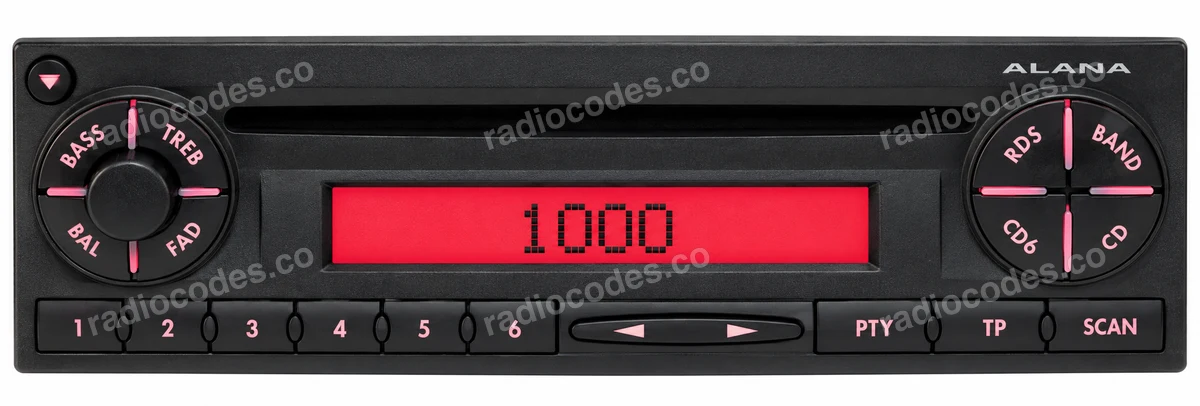
Alana
This photo helps you recognise the radio. Select a label thumbnail to see where to find its serial number.
Alana / Aura / Scala · CD / MP3
- Switch off the radio and ignition. Depending on the mounting, use the correct radio removal keys, or remove the trim and undo the retaining screws. Slide the unit out far enough to see its label.
- Check the top, sides and back of the casing. Look for the number starting with SEZ, printed on the label or stamped into the metal. Take a clear photo of the entire label.
- Enter the complete serial number in the form. Keep every letter and zero, including a zero at the start of the numeric section. Compare your entry with the label before continuing.
Older Grundig radios may have a serial starting with SE3841 or SE3842 instead of SEZ. Copy the whole number. The gallery also includes Scala and SE 350 labels.
How do I enter the code?
On Alana / Alana MP3, “SAFE” changes to “1000” after switching on. Set each digit with station buttons 1–4. Hold SCAN until you hear the confirmation tone and “SAFE” appears briefly. This is the restart procedure after a power loss; PTY is used for other coding settings. Aura and Scala have their own instructions.
SEAT MP3
- Switch on the radio and check its display. Some SEAT MP3 versions show a number beside serial n° on the “error code” screen pictured here.
- If this screen is already visible, copy the complete SEZ number. “SAFE 1” and “error code” are neither the serial number nor the PIN.
- If no serial is displayed, slide the radio out and read the label on its casing. You do not need to trigger an error to use the label method.
This method applies to the radio with the screen shown here. Not every SEAT radio displays its serial, and “SAFE” alone does not identify the unit.
Media System · RNS 310 / 315 / 510
- Switch off the radio and ignition. Depending on the mounting, use the correct radio removal keys, or remove the trim and undo the retaining screws. Slide the unit out far enough to see its label.
- Check the top, sides and back of the casing. Look for the number starting with SEZ, printed on the label or stamped into the metal. Take a clear photo of the entire label.
- Enter the complete serial number in the form. Keep every letter and zero, including a zero at the start of the numeric section. Compare your entry with the label before continuing.
The gallery shows the front and label of an RNS 315. Media System covers several generations. Newer units with component protection need a different procedure.
How do I enter the code?
If your radio displays a touchscreen code keypad, enter the four digits and press OK. On versions operated by a rotary control, select and confirm the digits using that control. This does not apply to a component protection message or to every older front panel.
Scala
- Switch off the radio and ignition. Depending on the mounting, use the correct radio removal keys, or remove the trim and undo the retaining screws. Slide the unit out far enough to see its label.
- Check the top, sides and back of the casing. Look for the number starting with SEZ, printed on the label or stamped into the metal. Take a clear photo of the entire label.
- Enter the complete serial number in the form. Keep every letter and zero, including a zero at the start of the numeric section. Compare your entry with the label before continuing.
Find the serial number on the label or stamped into the metal casing. It is marked in red in the label photos. Copy the complete number, including letters and zeros. The model name, part number and “SAFE” or “1000” on screen do not replace the serial number. The code confirmation controls depend on the radio version.
A typical SEZ serial has 14 characters. It identifies the radio, and is different from the vehicle VIN, part number and 4-digit code.
Have a different radio?
Grundig, or a radio that is not pictured? Find the serial number on its label or stamped into the casing. Enter it in full in the form, including every letter and zero. A “Component protection” message needs diagnosis, rather than a standard radio PIN.
Seat radio code questions
Seat radio code — all supported models
How it works
Recover the code for your Seat radio in three simple steps.
Prepare your radio details
Follow the guide for your radio to find the serial number, VIN or other details requested in the form.
Order your radio code
Enter the required details and your email address. Check your information, then pay securely online.
Receive your code by email
Your code arrives in your inbox. Follow the instructions for your radio to use it and get your music back.