
Radio asking for a code after a battery change?
Recover your Skoda radio code in 3 steps
Get Radio Code
Example radio identifiers: Skoda
Compare the format of your number. Enter the details from your own radio in the form, not these examples. Where can I find my radio’s serial number?
SKZAZ
SKZAZ5L1562111
SKZ
SKZ2Z3C1482102
SKZ
SKZ2Z3C1584105
SKZ
SKZ1Z3K8456819
Grundig
SK1161W0102520
Swing · Delphi
SKZ4Z2P1452779
Dance · Visteon
SKZ7Z3H0025985
Stream · Visteon
SKZ7Z3G0015065
Symphony · Grundig
SKZ2Z3C1584108
Octavia Mid · Blaupunkt
SKZ1Z3K8435040
How to find your Skoda radio serial number
Choose the radio that looks like yours. See where to find its serial number and what to enter in the form.
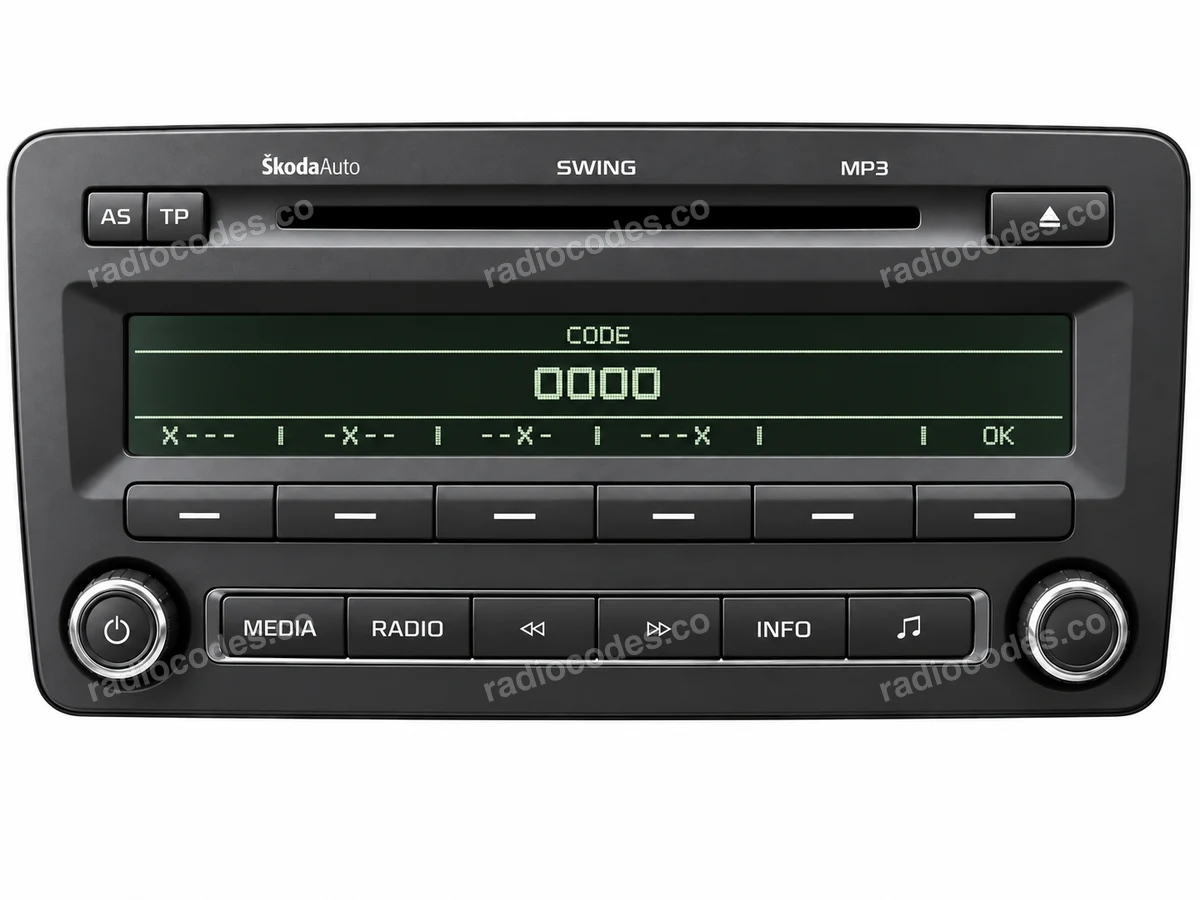
Swing
This photo helps you recognise the radio. Select a label thumbnail to see where to find its serial number.
Swing
- Switch off the radio and ignition. Depending on the mounting, use the correct radio removal keys, or remove the trim and undo the retaining screws. Slide the unit out far enough to see its label.
- Check the top, sides and back of the casing. Look for the number starting with SKZ, printed on the label or stamped into the metal. Take a clear photo of the entire label.
- Enter the complete serial number in the form. Keep every letter and zero, including a zero at the start of the numeric section. Compare your entry with the label before continuing.
The Swing shown here has its serial on the label. Do not confuse SKZ with the part number or Delphi number. Newer touchscreen Swing units may use a different security system.
How do I enter the code?
For the older Swing version pictured, switch on the ignition, then the radio. Press station buttons 1–4 repeatedly to set the four digits, one button for each digit. Check the complete code and press station button 6 to confirm.
Dance / Stream
- Switch off the radio and ignition. Depending on the mounting, use the correct radio removal keys, or remove the trim and undo the retaining screws. Slide the unit out far enough to see its label.
- Check the top, sides and back of the casing. Look for the number starting with SKZ, printed on the label or stamped into the metal. Take a clear photo of the entire label.
- Enter the complete serial number in the form. Keep every letter and zero, including a zero at the start of the numeric section. Compare your entry with the label before continuing.
The front photo shows Dance. The gallery also includes a Stream label. These serials can contain several zeros after the letter; keep all of them.
Symphony
- Switch off the radio and ignition. Depending on the mounting, use the correct radio removal keys, or remove the trim and undo the retaining screws. Slide the unit out far enough to see its label.
- Check the top, sides and back of the casing. Look for the number starting with SKZ, printed on the label or stamped into the metal. Take a clear photo of the entire label.
- Enter the complete serial number in the form. Keep every letter and zero, including a zero at the start of the numeric section. Compare your entry with the label before continuing.
Find the serial number on the label or stamped into the metal casing. It is marked in red in the label photos. Copy the complete number, including letters and zeros. The model name, part number and “SAFE” or “1000” on screen do not replace the serial number. The code confirmation controls depend on the radio version.
Symphony / Blues · Bolero / Amundsen / Columbus
- Switch off the radio and ignition. Depending on the mounting, use the correct radio removal keys, or remove the trim and undo the retaining screws. Slide the unit out far enough to see its label.
- Check the top, sides and back of the casing. Look for the number starting with SKZ, printed on the label or stamped into the metal. Take a clear photo of the entire label.
- Enter the complete serial number in the form. Keep every letter and zero, including a zero at the start of the numeric section. Compare your entry with the label before continuing.
The gallery shows a Bolero front panel and Symphony and Octavia Mid labels. For Bolero, Amundsen and Columbus, check the label on your own unit. Older Grundig serials can start with SK11… instead of SKZ. Newer generations may use component protection.
How do I enter the code?
If your radio displays a touchscreen code keypad, enter the four digits and press OK. On versions operated by a rotary control, select and confirm the digits using that control. This does not apply to a component protection message or to every older front panel.
A typical SKZ serial has 13 characters. It identifies the radio, and is different from the vehicle VIN, part number and 4-digit code.
Also attach a photo of the label on the radio casing to your order. The form requires this even if you read the serial number on screen.
Have a different radio?
Grundig, or a radio that is not pictured? Find the serial number on its label or stamped into the casing. Enter it in full in the form, including every letter and zero. A “Component protection” message needs diagnosis, rather than a standard radio PIN.
Skoda radio code questions
Skoda radio code — all supported models
How it works
Recover the code for your Skoda radio in three simple steps.
Prepare your radio details
Follow the guide for your radio to find the serial number, VIN or other details requested in the form.
Order your radio code
Enter the required details and your email address. Check your information, then pay securely online.
Receive your code by email
Your code arrives in your inbox. Follow the instructions for your radio to use it and get your music back.