
Radio asking for a code after a battery change?
Recover your Suzuki radio code in 3 steps
Get Radio Code
Example radio identifiers: Suzuki
Compare the format of your number. Enter the details from your own radio in the form, not these examples. Where can I find my radio’s serial number?
Bosch Connect
7452451
Part / device / model number: 7 612 830 090
Date: 11.09.28
Bosch
8023421 7644061210
6 9961247 7674063510 0
9548724 7643063510
SLN · VIN
MA3YKLA21RT101068
TSMLYDA1S00226172
How to find your Suzuki radio details
Choose the radio that looks like yours to find the details for the form.
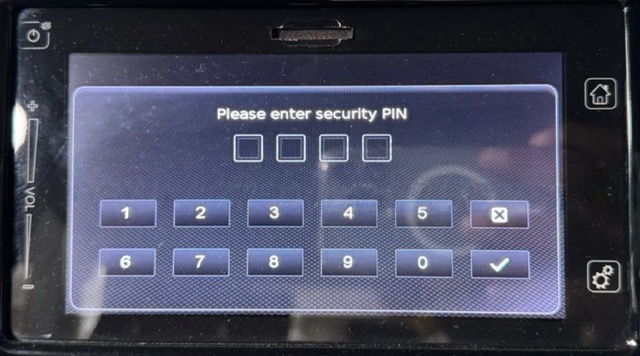
Suzuki SLN
- Compare your radio with the photo. SLN may request a 4-digit PIN or display a message asking you to contact your dealer.
- Read the 17-character VIN from your registration document, the plate below the windscreen or the door pillar.
- Select Suzuki SLN (VIN) in the form and enter the VIN. Code-entry instructions are included with your order.
SLN uses a different procedure from Bosch Connect. Do not use three incorrect attempts to display its details.
Bosch / Blaupunkt
- Switch off the radio and slide it out to read the casing label. The removal method depends on the dashboard.
- Below the barcode, find the 7-digit serial and 10-digit part number. Enter both together in one field, for example 9548724 7643063510.
- Keep every zero. Do not replace this sequence with the Suzuki part number starting with 39101.
Bosch navigation
- Switch on the ignition and radio. On the PIN screen, enter an incorrect 4-digit code and press OK. Do this 3 times in total. This displays the radio details.
- The screen will show Serial number, Device number and Date. Copy all three values, including leading zeros. Keep the date digits in their original order.
- Enter the details in the form. You can order during the countdown; enter the code into the radio once it finishes.
If Device number is cut off, read all 10 digits from the casing label. Keep the serial number and date from the screen.
How to find the vehicle VIN
The VIN is your vehicle’s 17-character identification number. Choose a location to see an example.
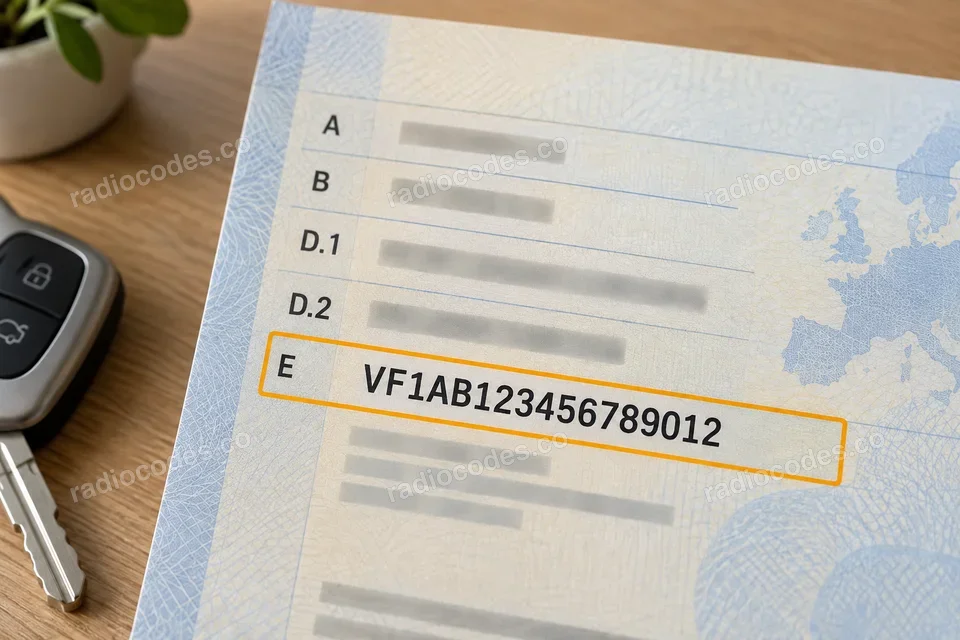
Details in this photo
VF1AB123456789012
Clearest number
Registration document
Start with your vehicle registration document — the VIN is clear and easy to read.
Door pillar
Open a front door and check the sticker or plate on the pillar. Depending on the model, it may be on the driver’s or passenger’s side.
Windscreen
Look from outside along the bottom edge of the windscreen. Find the small window showing the VIN on the dashboard.
Under the bonnet
Open the bonnet and look for the VIN stamped into the metal bodywork, for example near a suspension strut tower. Use the chassis number, not the engine number.
VIN locations vary by model and year. The illustrations show example locations.
Suzuki radio code questions
How it works
Recover the code for your Suzuki radio in three simple steps.
Prepare your radio details
Follow the guide for your radio to find the serial number, VIN or other details requested in the form.
Order your radio code
Enter the required details and your email address. Check your information, then pay securely online.
Receive your code by email
Your code arrives in your inbox. Follow the instructions for your radio to use it and get your music back.