
Radio asking for a code after a battery change?
Recover your Toyota radio code in 3 steps
Get Radio Code
Example radio identifiers: Toyota
Compare the format of your number. Enter the details from your own radio in the form, not these examples. Where can I find my radio’s serial number?
ERC
04B7D29A6E183FC5
0007A26BD93E5184
VIN
JTDBE32K020123456
2T1BR32E05C123456
Where to find your Toyota radio details
Choose your method. You can read the ERC on screen without removing the radio.
Video: finding the ERC on an NSZT-W66T
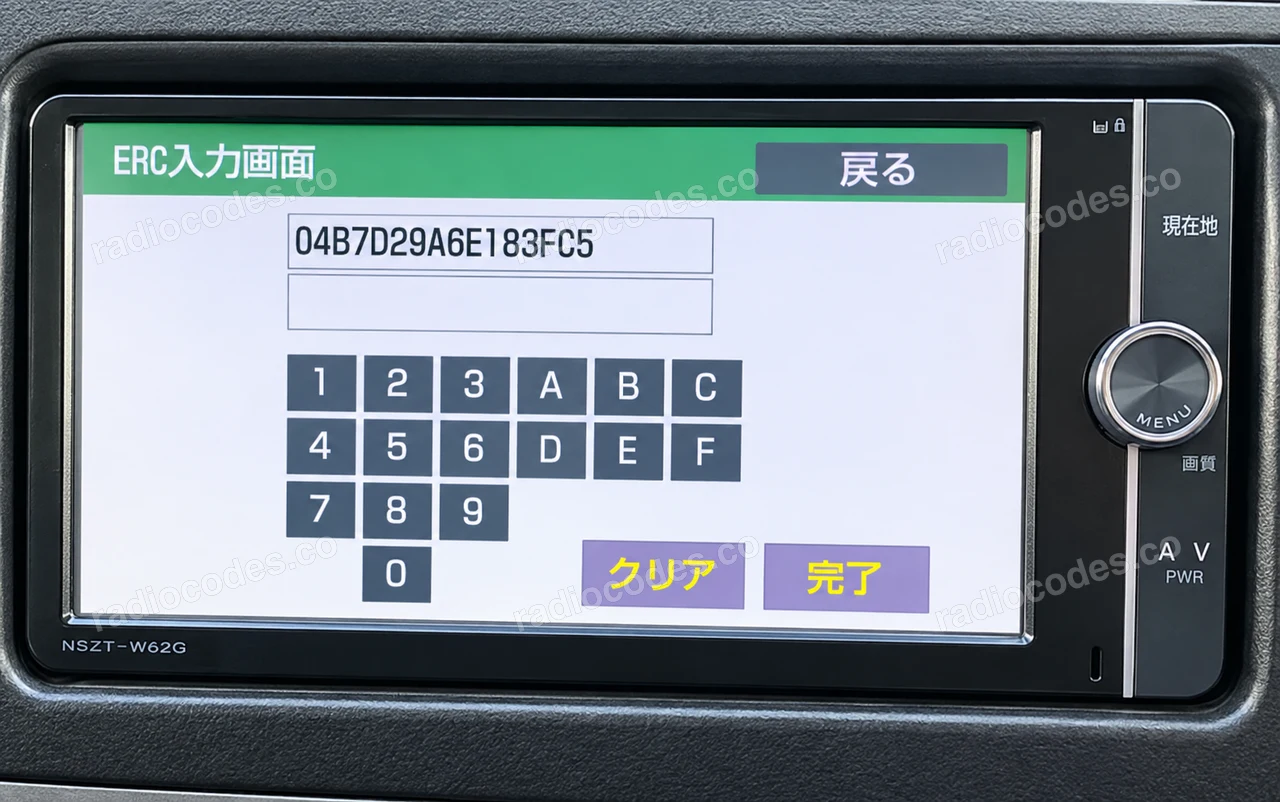
Illustrative photos. Copy the details from your own radio.
Number in the photo
- 04B7D29A6E183FC5
Map button and parking lights
- Switch on the navigation unit. Hold 現在地 (MAP, current location); older units may label this button G·INFO.
- Keep holding the button and switch the parking lights on and off 3–4 times until a new menu appears.
- Tap the active button. If a service menu appears, select サービス情報, then セキュリティ解除コード入力. This option may be on a later menu page.
- Copy the 16-character ERC from the top of the screen and check the model on the radio's front panel. Enter both in the form above.
No change? Try MENU / 設定
- On some units, hold MENU or 設定 (settings) until the picture adjustment screen appears.
- Tap the top-left corner, then the bottom-left corner of the screen. Repeat this pair of taps 3 times.
- In the service menu, select サービス情報 → セキュリティ解除コード入力 and read the ERC. If your menu differs, check your model's instructions.
Use the ERC shown on screen, not the shorter “シリアルNo.” or a number on the casing. Keep every letter and leading zero.
This method covers select factory radios in the Corolla and Camry, including some from 2000–2005. The form checks supported VIN formats.
How to find the vehicle VIN
The VIN is your vehicle’s 17-character identification number. Choose a location to see an example.
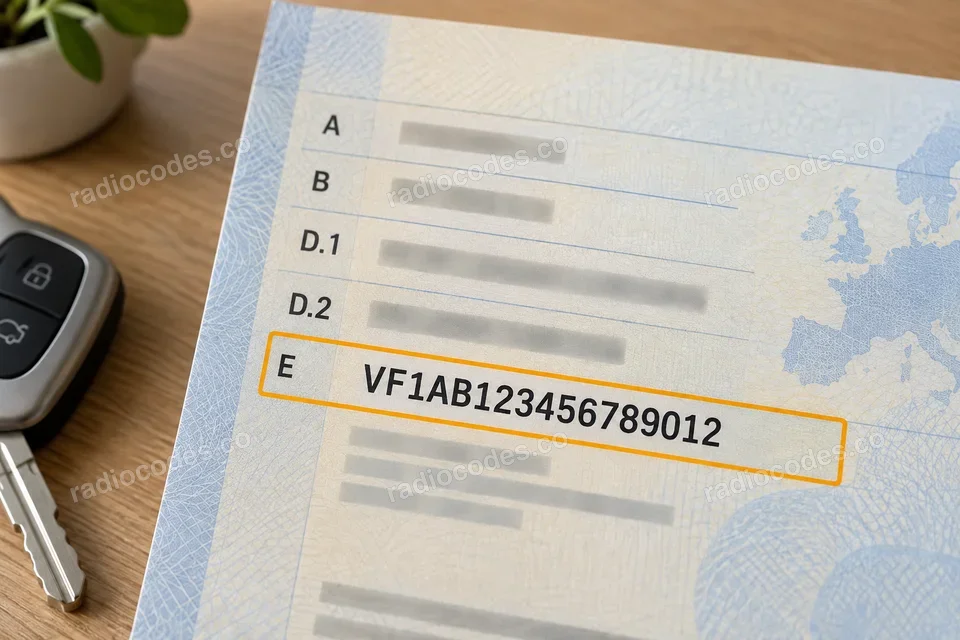
Number in the photo
VF1AB123456789012
Clearest number
Registration document
Start with your vehicle registration document — the VIN is clear and easy to read.
Door pillar
Open a front door and check the sticker or plate on the pillar. Depending on the model, it may be on the driver’s or passenger’s side.
Windscreen
Look from outside along the bottom edge of the windscreen. Find the small window showing the VIN on the dashboard.
Under the bonnet
Open the bonnet and look for the VIN stamped into the metal bodywork, for example near a suspension strut tower. Use the chassis number, not the engine number.
VIN locations vary by model and year. The illustrations show example locations.
Copy the full 17-character VIN into the form's VIN tab. Keep every letter and digit.
If your radio displays an ERC, choose Navigation with ERC. The vehicle's VIN cannot replace that radio's details.
Radio models with ERC
Check the radio's model label. The car model or year alone does not identify the fitted unit.
New models 68
NSCN-W68, NSLN-W68, NSZT-Y68, NSZN-Z68
New models 68T
NSZT-W68T, NSZT-Y68T, NSZN-Z68T, X68T
New models HV 68T
HV W68T, HV Y68T, HV Z68T
NS
NSCD-W66, NSCN-W59C, NSCN-W60, NSCN-W68, NSCP-W61, NSCP-W62, NSCP-W64, NSCT-W61, NSDD-W61, NSDN-W59, NSDN-W60, NSDT-W59, NSLN-W68, NSZN-Z68T, NSZA-X64T, NSZT-W60, NSZT-W61G, NSZT-W62G, NSZT-W64, NSZT-Y68, NSZN-Z68, NSZT-Y66T, NSZT-W66T, NSZT-W68T, NSZT-Y68T
NH
NH3N-W58, NH3T-W57, NHBA-W62G, NHDA-W61G, NHDT-W57, NHDT-W58, NHDT-W58G, NHDT-W59, NHDT-W59G, NHDT-W60G, NHZD-W62G, NHZN-W57, NHZN-W58, NHZN-W59C, NHZN-W59G, NHZN-W60G, NHZN-W61, NHZN-W61G, NHZT-W58, NHZT-W58G
ND
ND3T-W56, ND3T-W57, NDCN-D55, NDCN-W55, NDDA-W55, NDDA-W56, NDDN-W56, NDDN-W57, NDDN-W58
NM
NMCN-D51, NMCN-W51M, NMCT-W51
DS
DSZT-YC4T
Toyota radio code questions
How it works
Recover the code for your Toyota radio in three simple steps.
Prepare your radio details
Follow the guide for your radio to find the serial number, VIN or other details requested in the form.
Order your radio code
Enter the required details and your email address. Check your information, then pay securely online.
Receive your code by email
Your code arrives in your inbox. Follow the instructions for your radio to use it and get your music back.