
Ford CD3XX-CD6-ISLAND-KW2000 / CDX-FC307FB radio code
Get your original Ford CD3XX-CD6-ISLAND-KW2000 / CDX-FC307FB radio code (SONY) online in 3 minutes. Receive your code by email — no dealer visit required.
Ford CD3XX-CD6-ISLAND-KW2000 / CDX-FC307FB serial number format
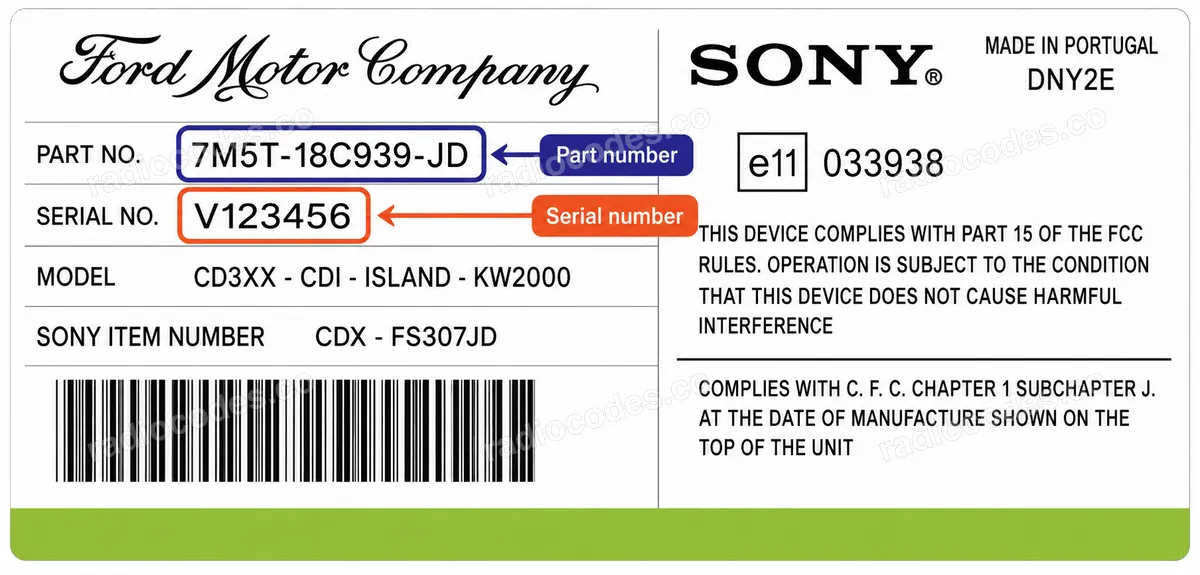
V123456
- Serial number length: 7 characters
- The serial number starts with V
The unlock code for this unit is calculated from the serial number printed on the label. Enter the serial in full, exactly as printed and in the format shown above — the leading letter is part of the serial. On some models the serial can also be shown on the display by holding preset buttons 1 and 6 with the radio switched on.
How to enter the code into your Ford CD3XX-CD6-ISLAND-KW2000 / CDX-FC307FB
Entering the code takes only a moment. Please follow these steps: 1. Switch the radio on. The display shows CODE with four flashing dashes: " - - - - ". 2. Press preset button 1 repeatedly until the first digit of your code appears. 3. Press preset button 2 repeatedly to set the second digit. 4. Press preset button 3 repeatedly to set the third digit. 5. Press preset button 4 repeatedly to set the fourth digit. 6. Check that the display shows your complete code, then press preset button 5 to confirm. That's it — your radio should unlock right away. If you make a mistake on any digit, simply keep pressing the same preset button until the correct digit comes around again.
How it works
Recover the code for your Ford CD3XX-CD6-ISLAND-KW2000 / CDX-FC307FB radio in three simple steps.
Prepare your radio details
Follow the guide for your radio to find the serial number, VIN or other details requested in the form.
Order your radio code
Enter the required details and your email address. Check your information, then pay securely online.
Receive your code by email
Your code arrives in your inbox. Follow the instructions for your radio to use it and get your music back.
Supported Ford CD3XX-CD6-ISLAND-KW2000 / CDX-FC307FB part numbers
Check the list below for your radio's part number. Supported part numbers: 1.
- 7M5T-18C939-FB