
Honda HR-V radio code
Get your original Honda HR-V radio code online in 3 minutes. Receive your code by email — no dealer visit required.
Get Radio Code
Example radio identifiers: Honda
Compare the format of your number. Enter the details from your own radio in the form, not these examples. Where can I find my radio’s serial number?
8 digits
10014744
U / L
U1001 L4744
3 letters + 8 digits
GEB29013851
Letters and digits
954LR052
Pioneer
FBPE066260EW
Pioneer
BJ001841
Blaupunkt · BP
BP5022S0692058
6 digits (Gathers)
542533
How to find your Honda radio serial number
Choose the method that matches your radio. Use the photos to recognise the unit and find the right number.
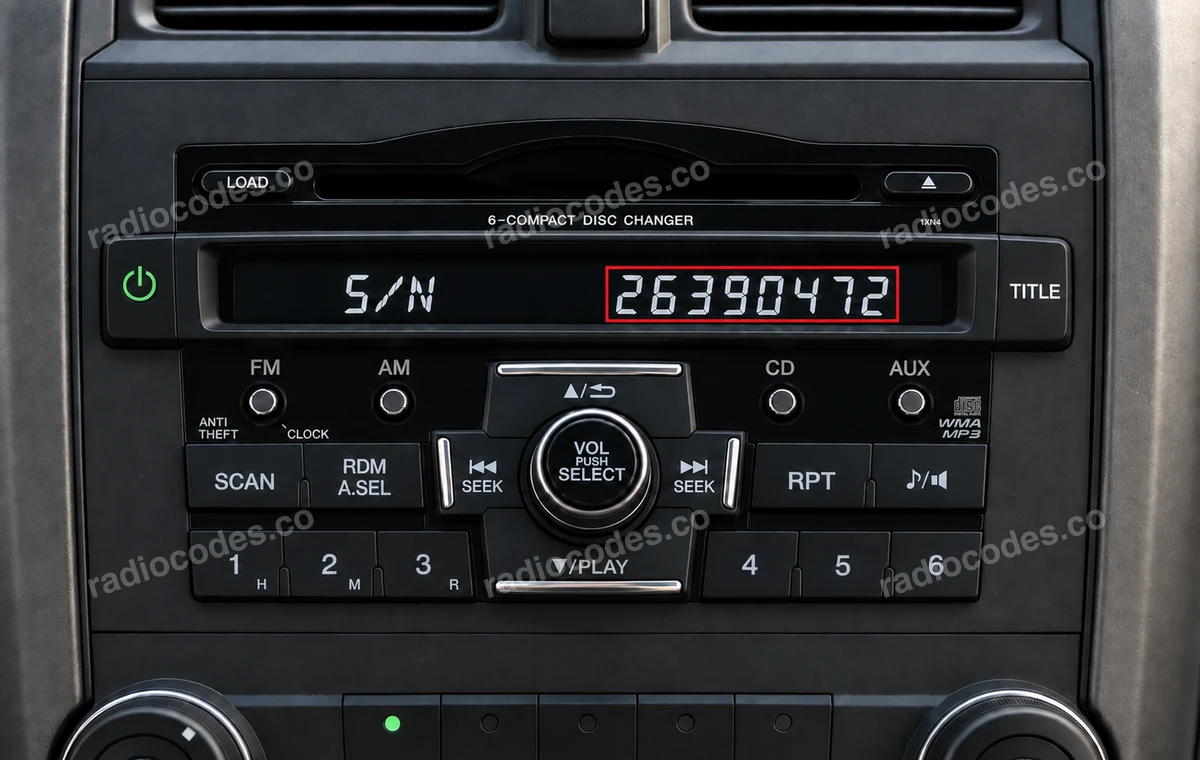
Photos are examples. Copy the number from your own radio, including its letters and zeros.
Number in the selected photo:
26390472
Radio with buttons 1–6
- Turn on the ignition and radio. When CODE appears, turn off just the radio, leaving the ignition on.
- Hold preset buttons 1 and 6. While holding them, turn on the radio using Power / PWR/VOL.
- Write down the number displayed. If the display alternates between U and L, join the four digits after U to the four after L. For example, U2639 and L0472 become 26390472. Keep the zero in the second group.
- Enter the eight digits in the form. If a complete number appears beside S/N, copy that number. If you cannot display it, check the code card or the label on the casing.
No CODE message? For older radios, Honda's instructions describe removing the BACK UP fuse for one minute, then repeating the procedure. Identify the correct fuse in your vehicle's manual first; do not remove an arbitrary fuse.
Accord 2003–2007
- Set the ignition to ACC (I). Turn on the radio and check that the upper display shows CODE. Then turn off just the radio.
- Hold the upper halves of SEEK/SKIP and CH/DISC. While holding them, press and release the PWR/VOL knob.
- The display alternates between U with the first four digits and L with the last four. Write down both groups and join the digits in U-then-L order, leaving out those two letters.
- Enter the eight digits in the form. This is the audio unit's serial. If the navigation system separately asks for a code, use the “Older navigation” guide to find its serial.
This method applies to versions with these controls. Without navigation, use the 1–6 method. If CODE is missing, see the BACK UP fuse note under “Radio with buttons 1–6”. The photos illustrate the U/L display format; the panel layout depends on the radio version.
Display Audio / touchscreen
- Switch on the ignition and radio. On the appropriate panel, hold Power + MENU + day/night or Power + Eject + HOME for about 3 seconds until diagnostics appears. Use the combination that matches your unit's buttons.
- Open Detail Information & Setting → Unit Check → HMI Unit or DA Unit. Photograph Serial No. and Model. On versions without this diagnostic menu, check HOME → Info → System/Device Information → System Info.
- Exit with Back / Return. Enter the complete number from Serial No. in the form to check code availability for this unit.
Not every Honda Connect or Display Audio unit is supported by our service. Menu names vary by version. Do not change diagnostic settings.
Older navigation
- Turn on the ignition and navigation screen. Hold MAP/GUIDE, MENU and CANCEL together for a few seconds until the diagnostic menu appears. If this combination does not work or one of the buttons is missing, try holding SETTINGS, INFO and BACK together for a few seconds.
- Select Detail Information & Setting → Unit Check → Navi ECU. If Unit Check is already available, start there. Other versions use Detail Information & Settings → Unit Check → ECU Info. Record the value beside Serial No., including every letter.
- Exit using Return / Back. Enter the serial in the form. If the menu differs or the buttons are missing, read the number from the label on the casing.
The radio and navigation system can have separate serials and codes. Navi ECU shows the navigation serial. Do not select Mem Clear or other memory-clearing options. Some versions display a number beside the code entry boxes: photograph it too, and do not confuse it with the security code.
Serial on the label
- Check the code card and any stickers in the glovebox. If the serial is missing and the screen method does not work, you need access to the label on the top, side or rear of the radio.
- Take a clear photo of the entire label. Look for SERIAL NO., Serial No. or S/N. Do not use the model or part number instead, such as a number beginning with 39100 or 39101.
- Enter the complete serial from your label, keeping letters and leading zeros. Check it character by character before submitting the form.
Honda serials come in several formats: six or eight digits, letters mixed with digits, and longer strings. Do not use only the last few characters. Removal depends on the dashboard; ask a workshop for help if you are unfamiliar with the fittings.
Older Blaupunkt radios
- Check the radio's model name. Our catalogue includes 150R, 200R, A Concerto, Access A HES 122R, Access C HES 345R, SN7 A/B/C, ST3 and TravelPilot RNS3.
- Read the label or marking on the casing. Look for the complete serial starting with BP. The separate number beginning with 7 is a part number.
- Enter the full BP serial in the form. For code entry and confirmation, choose your exact radio model from the catalogue further down the brand page.
Honda's 1–6 method does not apply to these units. Older Blaupunkt radios use different controls to set digits and confirm the code. Their individual instruction pages remain available. The Dublin C30 label illustrates the BP serial format; it is not a factory Honda model.
Other radios / Gathers
- Check the model designation on the front panel or label. Identify whether the radio or navigation system is asking for a code so you read the correct unit’s details.
- Find SERIAL NO., Serial No. or S/N on the label. Copy the complete number, keeping all letters and zeros. This also applies to Gathers, imported units and radios fitted by a previous owner.
- Enter the serial in the form. Check code availability before payment. The radio’s appearance or Honda branding alone does not confirm that its serial is supported.
Supported Gathers models: VXM-145, VXM-155, VXM-165, VXM-175, VXM-185, VXM-195, VXM-205, VXM-215. Unsupported Gathers models: VXM-142, VXM-152, VXM-164, VXM-174, VXM-184, VXM-194, VXM-204. We do not support Fujitsu or JVCKENWOOD. We do not support serials starting with 400 (with two zeros). Do not remove letters or digits to make a serial fit the form.
Use the details from your own unit. The serial number identifies the radio — it is not the security code you enter on the radio.
Honda radio code questions
How it works
Follow these steps to get the radio code for your Honda HR-V without visiting a dealer or workshop.
Find the serial number
Remove the radio or open the diagnostic menu to note the serial number (look for numbers such as 542533, 10014744, U1001 L4744, GEB29013851, 954LR052, and FBPE066260EW). Clear photos help us validate it.
Order your Honda code
Enter your radio details and the email address where you'd like to receive your code.
Receive and enter the code
You'll receive your code by email. Enter it into your radio and get back to enjoying music on the road.
Quick facts for Honda HR-V owners
Instantly
Alpine, Panasonic, Pioneer, Mitsubishi, and Clarion
Honda Connect, Premium Audio, Display Audio, and Navigation
2015-2024
Before ordering a Honda HR-V radio code
Required information
For a Honda HR-V, prepare the radio serial number, part number, VIN, or a clear label photo if the form asks for it. Serial numbers often look like 542533, 10014744, U1001 L4744, GEB29013851, 954LR052, and FBPE066260EW.
What helps us find the right code
You can still order a code if your Honda HR-V radio has been replaced, has unusual markings or a hard-to-read label, or shows a lockout message. Clear photos and accurate details help us find the right code for you.
Why a code may fail
The most common causes are an incorrect serial number, a mismatched VIN, entering the code during a temporary lockout, or using it on a different radio from the one listed in your order.
Fast delivery and help with your code
We deliver codes for supported radio models instantly. If your code doesn't work on the radio listed in your order, report the issue using the form. We'll check the details and help you work out what's wrong.
Example serial numbers
Typical serial numbers you may see on a Honda HR-V radio:
- 542533
- 10014744
- U1001 L4744
- GEB29013851
- 954LR052
- FBPE066260EW
Honda radio models by part number
Find your exact Honda radio model or part number to see its serial number format and get the radio code.