
Iveco CD 24v radio code
Get your original Iveco CD 24v radio code (BLAUPUNKT) online in 3 minutes. Receive your code by email — no dealer visit required.
Get Radio Code
Iveco CD 24v serial number format
Blaupunkt-built units have a 14-character serial number (letters and digits) printed on the label or engraved on the metal case, for example BP3301Y1234567 or 3A053278005827. The 10-digit part number starting with 7 (e.g. 7 643 301 316) is also required for the calculation, so make sure it matches your unit. On some labels the serial is split into fragments (e.g. "4 9571489 7643063510 4") — combined, this reads as BP306349571489.
Example radio identifiers: Iveco
Compare the format of your number. Enter the details from your own radio in the form, not these examples. Where can I find my radio’s serial number?
Bosch
CM0098H2566406
Blaupunkt
BP700562953492
Continental Brasil · Security
L096
Aptiv
T0BYD294110168
Bosch
8023421 7644061210
Where is the Iveco radio number?
Choose a similar radio, then check the markings on its label.
Bosch Iveco Daily MY2014 LDWS
Bosch
- Slide the radio out to read the label on its casing.
- Find the number starting with BP or CM. It may have 815 in front. Keep every letter and zero.
- Enter it in the form above.
Aptiv
- Slide the Daily radio out and find the Aptiv label on the casing.
- Read T0BYD followed by 9 digits. The character after T is zero, not the letter O.
- Enter the full T0BYD number. A short S/N on another sticker cannot replace it.
Blaupunkt
- Slide the radio out to read the label on its casing.
- Find the number starting with BP or CM. It may have 815 in front. Keep every letter and zero.
- Enter it in the form above.
Continental Brasil
- Expose the Continental Brasil label on the casing.
- Find Security: one letter and three digits. Keep any zeros.
- Enter those four characters in the form. They identify the code to retrieve; they are not the code to enter on the radio.
Bosch
- Check the Bosch sticker beside the barcode.
- Read the 7-digit serial number and the 10-digit part number starting with 76.
- Enter both in one field: serial number first, then part number. Leave out the separate digits outside the highlighted numbers.
Daily Radio / Business Up
- The panel with buttons 1–5 and an ENTER knob may have a short, five-digit S/N on its label.
- Check the other labels on the casing. If you find T0BYD, choose the Aptiv guide.
- A five-digit S/N alone is not supported by this form. The original code may be recorded on the Radio Pass card.
How do I reach the label?
Turn off the radio and ignition. If the panel has removal holes, insert the matching release keys, release the clips and gently slide the radio out. For screw-mounted units, first remove the trim and undo the fixings as described in the vehicle manual. The label is on the top or side of the casing. Pull the radio out only far enough to read it; do not pull on the wiring.
Example radio models
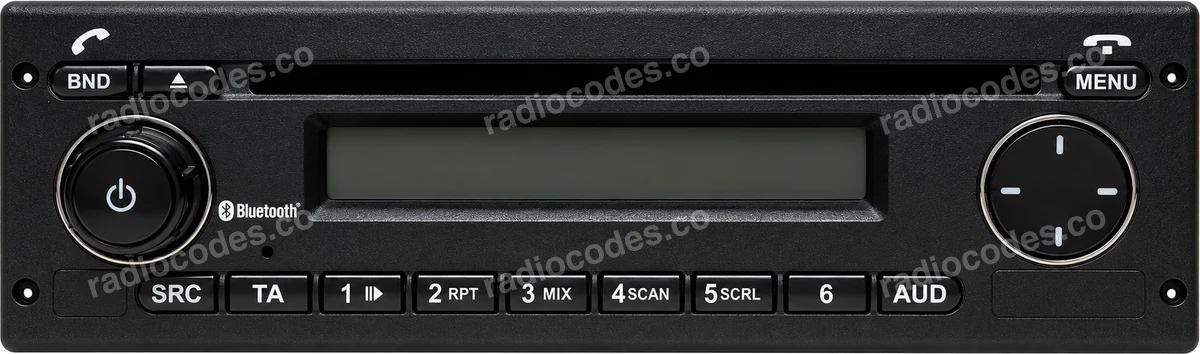
CD / CC 24V, TRC2446 RDS, Gamma S MY06, CD / MP3 SB08, MY2014 LDWS, Daily FUN, Stralis CD MP3, Eurocargo CD MP3
How to enter the code into your Iveco CD 24v
Entering the code takes only a moment. Please follow these steps: 1. Switch the radio on. The display shows "CODE" and then "0000". 2. Press preset button 1 repeatedly until the first digit of your code appears. 3. Press preset button 2 repeatedly to set the second digit. 4. Press preset button 3 repeatedly to set the third digit. 5. Press preset button 4 repeatedly to set the fourth digit. 6. Press the tuning up button "^" to confirm the code. That's it — your radio should unlock right away. If you make a mistake on any digit, simply keep pressing the same preset button until the correct digit comes around again.
How it works
Recover the code for your Iveco CD 24v radio in three simple steps.
Prepare your radio details
Follow the guide for your radio to find the serial number, VIN or other details requested in the form.
Order your radio code
Enter the required details and your email address. Check your information, then pay securely online.
Receive your code by email
Your code arrives in your inbox. Follow the instructions for your radio to use it and get your music back.
Supported Iveco CD 24v part numbers
Check the list below for your radio's part number. Supported part numbers: 3.
- 7 607 005 036Serial starts with BP5036
- 7 607 005 086Serial starts with BP5086
- 7 607 005 088Serial starts with BP5088