
Opel Corsa radio code
Get your original Opel Corsa radio code online in 3 minutes. Receive your code by email — no dealer visit required.
Get Radio Code
Example radio identifiers: Opel
Compare the format of your number. Enter the details from your own radio in the form, not these examples. Where can I find my radio’s serial number?
Touch & Connect (Bosch)
0649275
Part / device / model number: 7612830142
Date: 13.05.24
Renault
B182
T0F312
281155248RTK123
7700434427TR107
8200057681TJ823
Daiichi
E1994
07362
GM
GM0205Y9032625
CAR 2003
GM020338351153
Part / device / model number: 7649200321
CAR 300
GM030M23016710
Part / device / model number: 7640852520
Bosch
GM003155744315
Part / device / model number: 7 644 221 310
Grundig
FA0926R1000417
GR0678N1199872
GM0303S4263430
Other
YS0896P1000120
DB0922R0999501
How to find your Opel radio details
Choose the radio that looks like yours to find the details for the form.
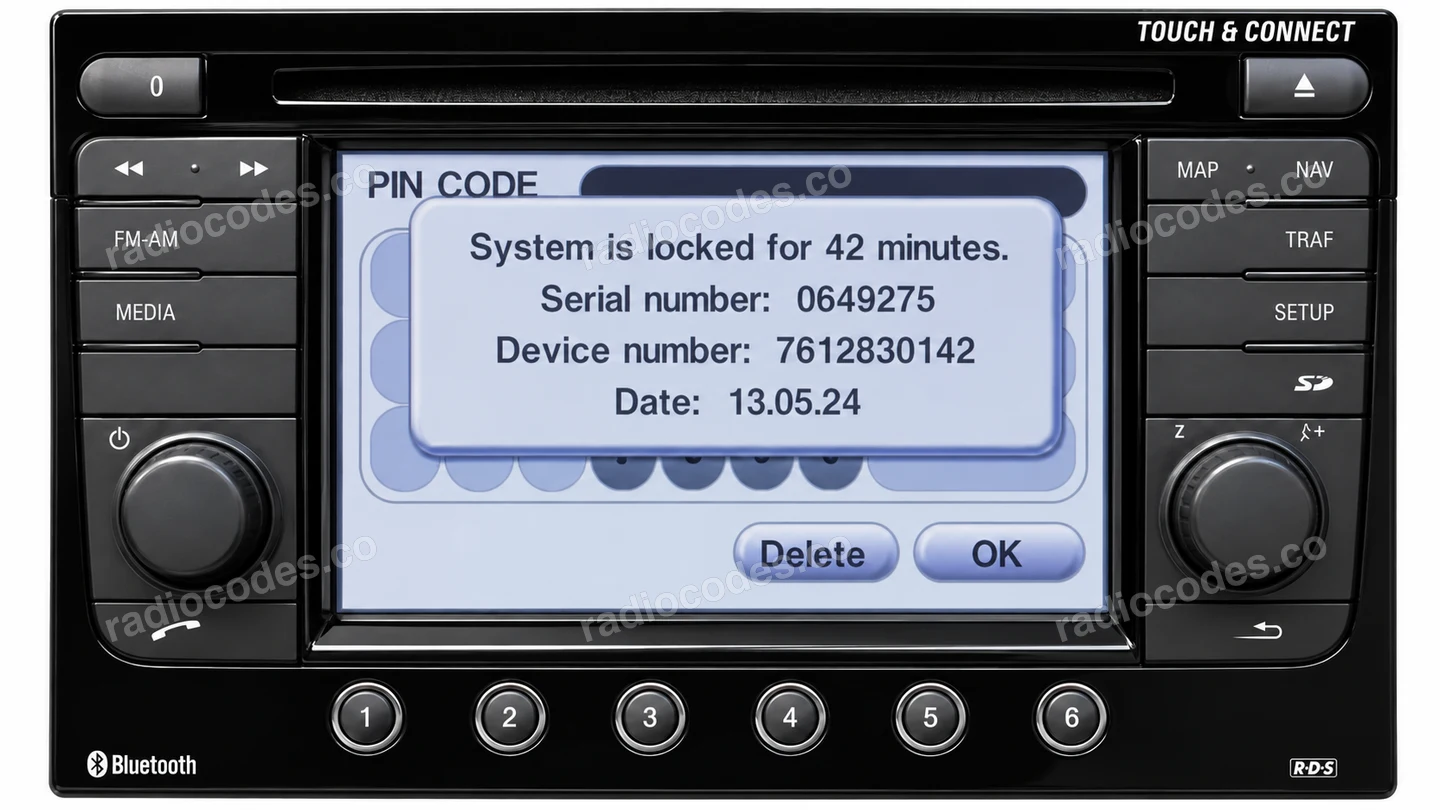
Details in this photo
- Radio serial number
- 0649275
- Part / device / model number
- 7612830142
- Date
- 13.05.24
Touch & Connect
- Switch on the ignition and radio. On the PIN screen, enter an incorrect 4-digit code and press OK. Do this 3 times in total. This displays the radio details.
- The screen will show Serial number, Device number and Date. Copy all three values, including leading zeros. Keep the date digits in their original order.
- Enter the details in the form. You can order during the countdown; enter the code into the radio once it finishes.
If Device number is cut off, read all 10 digits from the casing label. Keep the serial number and date from the screen.
Older radios
- Switch off the radio. If it has four holes on the front, insert suitable removal keys and gently slide it out. Do not pull on the cables.
- Find the full serial number on the label or stamped into the metal. Keep every letter and zero. Do not use the model number or GM part number.
- For Bosch/Blaupunkt, also copy the part number starting with 76 if the form requests it.
We support selected CAR 300, SC 202, Grundig, Delco CDR500, CDR2005, Philips units. Siemens/VDO is not supported, including its CDR500 versions. Check the manufacturer on the label.
Vivaro / Movano
- Slide out the radio using suitable removal keys. If it sits behind a trim panel, release the panel with a plastic tool and undo the mounting screws.
- Find the precode: one letter and 3 digits on the label. It may be at the end of a longer number, such as 281155911RTJ345.
- Enter the precode or the full label number. A part number without the final precode is not enough.
These examples cover Renault radios in Vivaro A/B and Movano B. Compare the panel and label. This method does not apply to later generations with different radios.
Daiichi
- Slide out the radio and read Serial No on the label. This is a short number, such as 00296.
- Enter the whole number, including leading zeros. Do not use Model No, FGA P/N or P. Date.
Opel radio code questions
How it works
Follow these steps to get the radio code for your Opel Corsa without visiting a dealer or workshop.
Find the serial number
Remove the radio or open the diagnostic menu to note the serial number (look for numbers such as GM003155744315, 7452451, B182, T0F312, 281155248RTK123, and 8200057681TJ823). Clear photos help us validate it.
Order your Opel code
Enter your radio details and the email address where you'd like to receive your code.
Receive and enter the code
You'll receive your code by email. Enter it into your radio and get back to enjoying music on the road.
Quick facts for Opel Corsa owners
Instantly
Blaupunkt, Bosch, Delco, Grundig, Philips, Continental, Delphi, and LG
CD300, CD400, CD500, CD600, Navi 900, IntelliLink, R 4.0 IntelliLink, Navi 5.0 IntelliLink, and Touch & Connect
2000-2024
Before ordering a Opel Corsa radio code
Required information
For a Opel Corsa, prepare the radio serial number, part number, VIN, or a clear label photo if the form asks for it. Serial numbers often look like GM003155744315, 7452451, B182, T0F312, 281155248RTK123, and 8200057681TJ823.
What helps us find the right code
You can still order a code if your Opel Corsa radio has been replaced, has unusual markings or a hard-to-read label, or shows a lockout message. Clear photos and accurate details help us find the right code for you.
Why a code may fail
The most common causes are an incorrect serial number, a mismatched VIN, entering the code during a temporary lockout, or using it on a different radio from the one listed in your order.
Fast delivery and help with your code
We deliver codes for supported radio models instantly. If your code doesn't work on the radio listed in your order, report the issue using the form. We'll check the details and help you work out what's wrong.