
Radio asking for a code after a battery change?
Recover your Sony radio code in 3 minutes
Get Radio Code
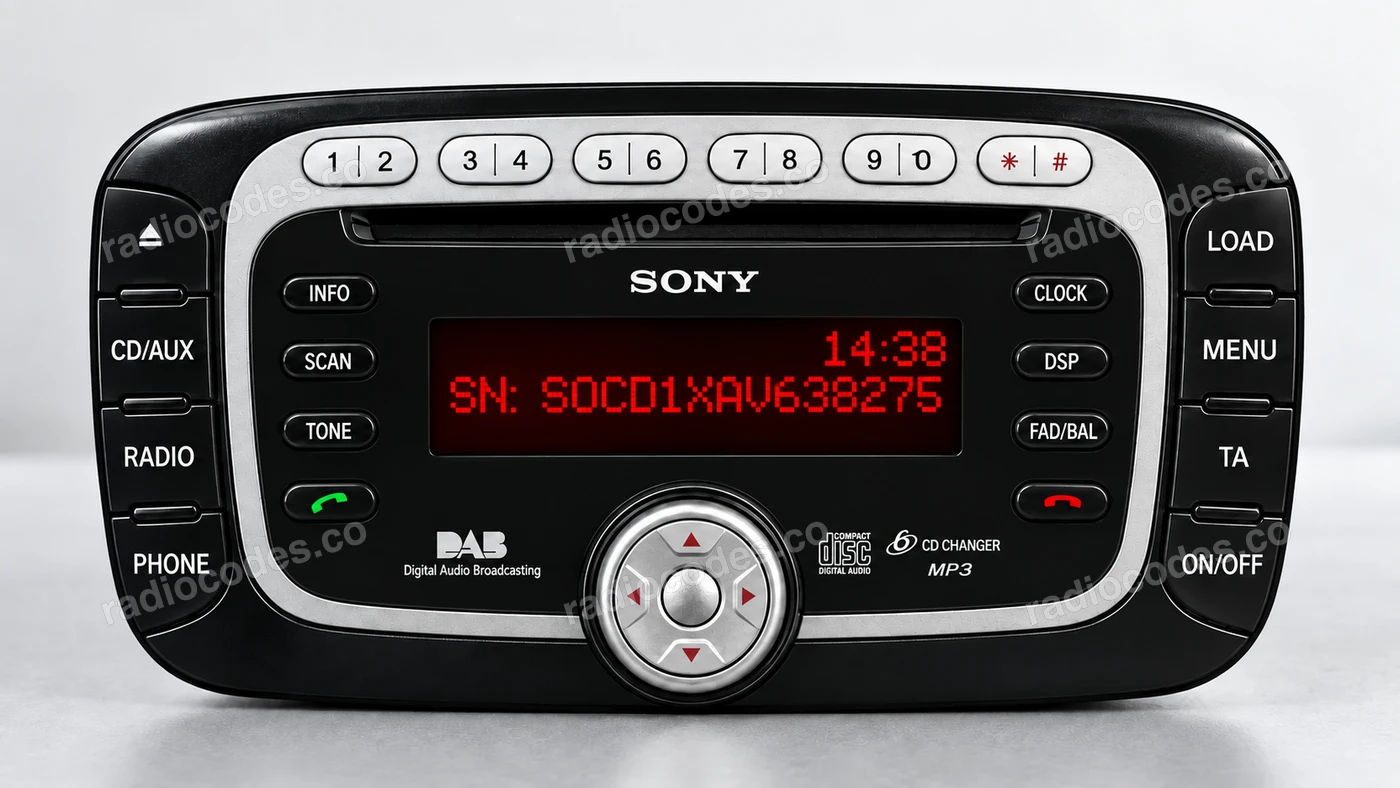
Example radio identifiers: Sony
Compare the format of your number. Enter the details from your own radio in the form, not these examples. Where can I find my radio’s serial number?
SONY
SOCD1XAV638275
SONY
V071936
SONY
M461927
How to find your Sony radio number
Choose a similar radio. The front helps you recognise it; the number on the casing identifies its version.
Sony CD132
- Switch the radio on. Hold buttons 1 and 6 together for a few seconds, then wait while the information screens cycle through.
- Look for V or M followed by 6 digits. A V number may appear at the end of a longer string. No number on the display? Read SERIAL NO. on the casing label.
No serial on the display? Slide the radio out and read SERIAL NO. or S/N on its casing label.
How do I enter the code?
On a Sony radio with a 0–9 keypad, enter the digits directly, then confirm with * or the centre button between the arrows, depending on the version. If your radio has a different button layout, check its manual.
Ford Sony CD · M
- Slide the radio out of the dashboard. Check the label and engraving on the casing, on the side or top.
- Find SERIAL NO. or S/N on the label. On this Sony model the number is M followed by 6 digits; write it down with every zero.
Copy the whole number with the M at the start. The Ford part number on the label is not the serial.
How do I enter the code?
On a Sony radio with a 0–9 keypad, enter the digits directly, then confirm with * or the centre button between the arrows, depending on the version. If your radio has a different button layout, check its manual.
How do I slide the radio out?
Switch off the radio and ignition. Use removal keys that fit the slots in the panel. If the radio is screwed in, follow the vehicle manual to remove the trim and undo the screws. Slide it out just far enough to read the label or engraving. Do not pull on the wires.
Sony radio code: questions and answers
How it works
Recover the code for your Sony radio in three simple steps.
Prepare your radio details
Follow the guide for your radio to find the serial number, VIN or other details requested in the form.
Order your radio code
Enter the required details and your email address. Check your information, then pay securely online.
Receive your code by email
Your code arrives in your inbox. Follow the instructions for your radio to use it and get your music back.