
Ford 6000 CD radio code
Get your original Ford 6000 CD radio code online in 3 minutes. Receive your code by email — no dealer visit required.
How it works
Follow these steps to get the radio code for your Ford 6000 CD without visiting a dealer or workshop.
Find the serial number
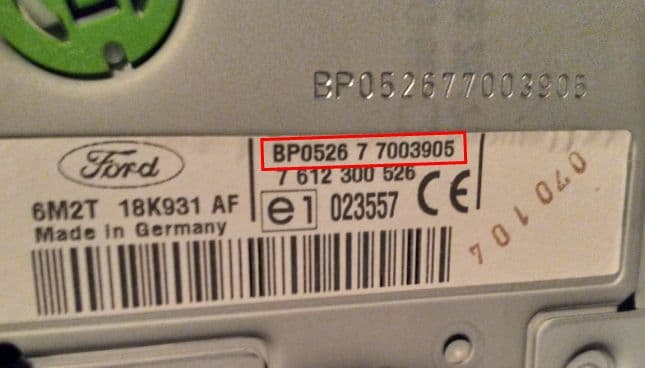
Remove the radio or open the diagnostic menu to note the serial number (look for numbers such as V123456 and M123456). Clear photos help us validate it.
Order your Ford code
Enter your radio details and the email address where you'd like to receive your code.
Receive and enter the code
You'll receive your code by email. Enter it into your radio and get back to enjoying music on the road.
Quick facts for Ford 6000 CD owners
Instantly
6000 CD
Before ordering a Ford 6000 CD radio code
Required information
For a Ford 6000 CD, prepare the radio serial number, part number, VIN, or a clear label photo if the form asks for it. Serial numbers often look like V123456 and M123456.
What helps us find the right code
You can still order a code if your Ford 6000 CD radio has been replaced, has unusual markings or a hard-to-read label, or shows a lockout message. Clear photos and accurate details help us find the right code for you.
Why a code may fail
The most common causes are an incorrect serial number, a mismatched VIN, entering the code during a temporary lockout, or using it on a different radio from the one listed in your order.
Fast delivery and help with your code
We deliver codes for supported radio models instantly. If your code doesn't work on the radio listed in your order, report the issue using the form. We'll check the details and help you work out what's wrong.
Example serial numbers
Typical serial numbers you may see on a Ford 6000 CD radio:
- V123456
- M123456
Ford 6000 CD radio code FAQ
Ford radio models by part number
Find your exact Ford radio model or part number to see its serial number format and get the radio code.