
Ford RADIO NAVIGATION SYSTEM radio code
Get your original Ford RADIO NAVIGATION SYSTEM radio code (BLAUPUNKT) online in 3 minutes. Receive your code by email — no dealer visit required.
Ford RADIO NAVIGATION SYSTEM serial number format
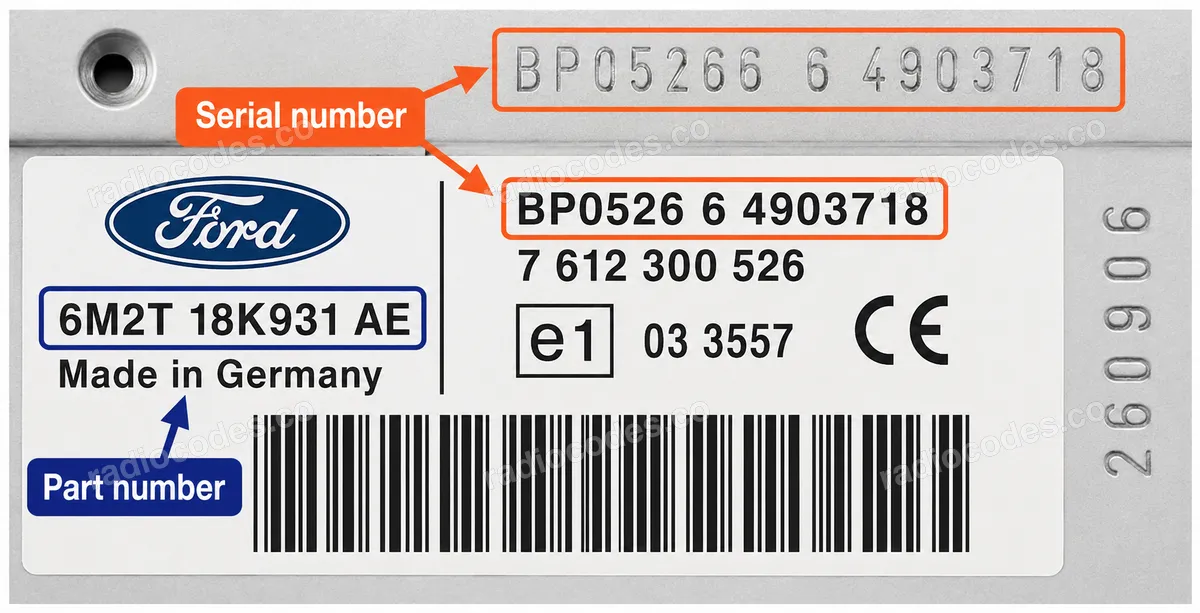
Blaupunkt-built units have a 14-character serial number (letters and digits) printed on the label or engraved on the metal case, for example BP3301Y1234567 or 3A053278005827. The 10-digit part number starting with 7 (e.g. 7 643 301 316) is also required for the calculation, so make sure it matches your unit. On some labels the serial is split into fragments (e.g. "4 9571489 7643063510 4") — combined, this reads as BP306349571489.
How it works
Recover the code for your Ford RADIO NAVIGATION SYSTEM radio in three simple steps.
Prepare your radio details
Follow the guide for your radio to find the serial number, VIN or other details requested in the form.
Order your radio code
Enter the required details and your email address. Check your information, then pay securely online.
Receive your code by email
Your code arrives in your inbox. Follow the instructions for your radio to use it and get your music back.
Supported Ford RADIO NAVIGATION SYSTEM part numbers
Check the list below for your radio's part number. Supported part numbers: 3.
- 7 612 001 040Serial starts with BP1040
- 7 612 001 386Serial starts with BP1386
- 7 612 001 442Serial starts with BP1442