
Iveco Daily radio code
Get your original Iveco Daily radio code (Daily Radio) online in 3 minutes. Receive your code by email — no dealer visit required.
Get Radio Code
Example radio identifiers: Iveco
Compare the format of your number. Enter the details from your own radio in the form, not these examples. Where can I find my radio’s serial number?
Bosch
CM0098H2566406
Blaupunkt
BP700562953492
Continental Brasil · Security
L096
Aptiv
T0BYD294110168
Bosch
8023421 7644061210
Where is the Iveco radio number?
Choose a similar radio, then check the markings on its label.
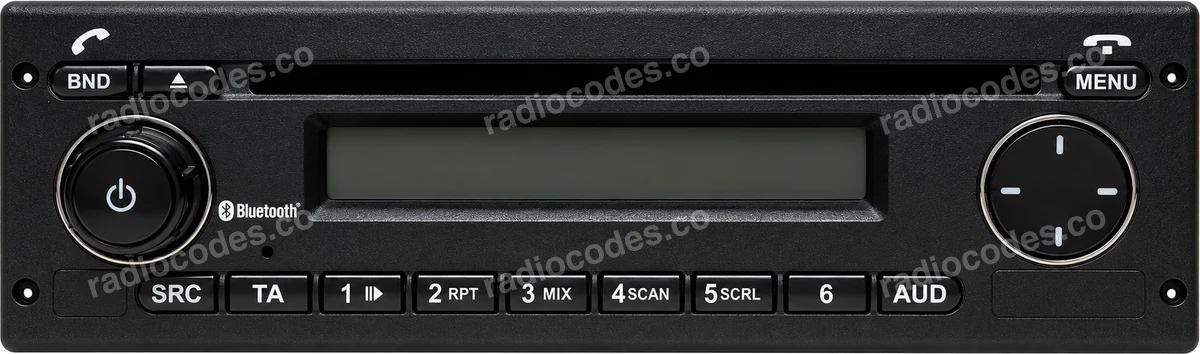
Bosch Iveco Daily MY2014 LDWS
Bosch
- Slide the radio out to read the label on its casing.
- Find the number starting with BP or CM. It may have 815 in front. Keep every letter and zero.
- Enter it in the form above.
Aptiv
- Slide the Daily radio out and find the Aptiv label on the casing.
- Read T0BYD followed by 9 digits. The character after T is zero, not the letter O.
- Enter the full T0BYD number. A short S/N on another sticker cannot replace it.
Blaupunkt
- Slide the radio out to read the label on its casing.
- Find the number starting with BP or CM. It may have 815 in front. Keep every letter and zero.
- Enter it in the form above.
Continental Brasil
- Expose the Continental Brasil label on the casing.
- Find Security: one letter and three digits. Keep any zeros.
- Enter those four characters in the form. They identify the code to retrieve; they are not the code to enter on the radio.
Bosch
- Check the Bosch sticker beside the barcode.
- Read the 7-digit serial number and the 10-digit part number starting with 76.
- Enter both in one field: serial number first, then part number. Leave out the separate digits outside the highlighted numbers.
Daily Radio / Business Up
- The panel with buttons 1–5 and an ENTER knob may have a short, five-digit S/N on its label.
- Check the other labels on the casing. If you find T0BYD, choose the Aptiv guide.
- A five-digit S/N alone is not supported by this form. The original code may be recorded on the Radio Pass card.
How do I reach the label?
Turn off the radio and ignition. If the panel has removal holes, insert the matching release keys, release the clips and gently slide the radio out. For screw-mounted units, first remove the trim and undo the fixings as described in the vehicle manual. The label is on the top or side of the casing. Pull the radio out only far enough to read it; do not pull on the wiring.
Example radio models
CD / CC 24V, TRC2446 RDS, Gamma S MY06, CD / MP3 SB08, MY2014 LDWS, Daily FUN, Stralis CD MP3, Eurocargo CD MP3
Iveco radio code: questions and answers
How it works
Follow these steps to get the radio code for your Iveco Daily without visiting a dealer or workshop.
Find the serial number
Remove the radio or open the diagnostic menu to note the serial number (look for numbers such as CM0098H2566406, BP700562953492, L096, T0BYD294110168, and 8023421 7644061210). Clear photos help us validate it.
Order your Iveco code
Enter your radio details and the email address where you'd like to receive your code.
Receive and enter the code
You'll receive your code by email. Enter it into your radio and get back to enjoying music on the road.
Quick facts for Iveco Daily owners
Instantly
Bosch, Blaupunkt, Continental, and Aptiv
Daily Radio
2006-2024
Before ordering a Iveco Daily radio code
Required information
For a Iveco Daily, prepare the radio serial number, part number, VIN, or a clear label photo if the form asks for it. Serial numbers often look like CM0098H2566406, BP700562953492, L096, T0BYD294110168, and 8023421 7644061210.
What helps us find the right code
You can still order a code if your Iveco Daily radio has been replaced, has unusual markings or a hard-to-read label, or shows a lockout message. Clear photos and accurate details help us find the right code for you.
Why a code may fail
The most common causes are an incorrect serial number, a mismatched VIN, entering the code during a temporary lockout, or using it on a different radio from the one listed in your order.
Fast delivery and help with your code
We deliver codes for supported radio models instantly. If your code doesn't work on the radio listed in your order, report the issue using the form. We'll check the details and help you work out what's wrong.
Iveco radio models by part number
Find your exact Iveco radio model or part number to see its serial number format and get the radio code.