
Radio asking for a code after a battery change?
Recover your Grundig radio code in 3 minutes
Get Radio Code
Example radio identifiers: Grundig
Compare the format of your number. Enter the details from your own radio in the form, not these examples. Where can I find my radio’s serial number?
GR
GR0842A1234567
FA
FA0985B1234567
DB
DB0922R0999501
SKZ
SKZ2Z3C1584108
VWZ
VWZ2Z2Y0649713
AUZ
AUZ2Z3A1080205
SEZ
SEZ2Z2H0719385
GM
GM0303S4263430
How to find your Grundig radio number
Choose a similar radio. The front helps you recognise it; the number on the casing identifies its version.
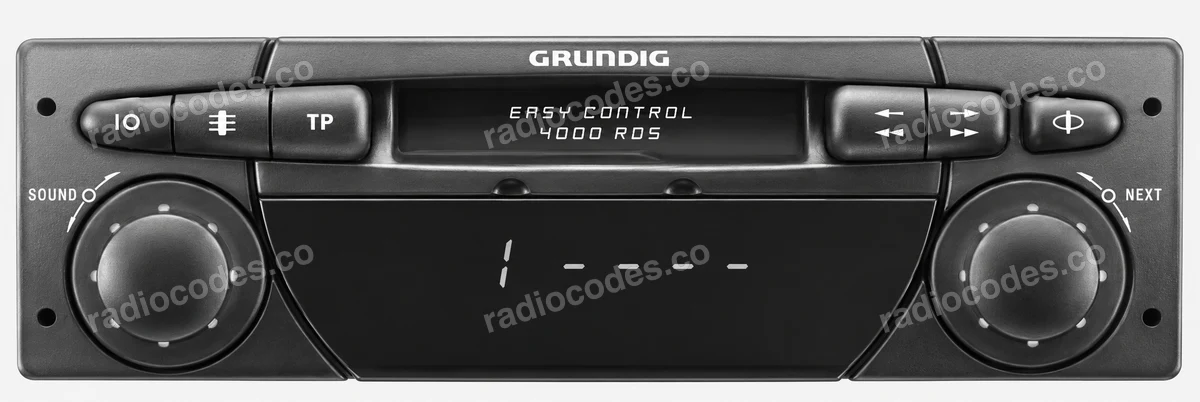
Grundig
- Slide the radio out of the dashboard. Check the label and engraving on the casing, on the side or top.
- Copy the full number, for example starting with GR, FA, DB or GM. Do not confuse it with the model name or part number.
The number may be stamped into the metal above the label. If the label is unreadable, check the engraving.
How do I enter the code?
EC 4000 RDS: switch on the radio. SAFE is followed by the attempt number and four dashes. Turn the right-hand control to set the code. Hold that control until SAFE appears briefly. The radio starts playing after about 3 seconds. The number before the dashes is the attempt count, not a code digit.
VW / Audi / Škoda / SEAT
- Slide the radio out of the dashboard. Check the label and engraving on the casing, on the side or top.
- Copy the full number starting with VWZ, AUZ, SKZ or SEZ. The radio manufacturer's logo does not change this prefix.
- Enter the serial in the form above. We will identify the vehicle brand and check code availability.
Availability depends on the serial and radio model. A photo does not mean every version is supported.
How do I enter the code?
VW Beta V: wait for 1000. Press buttons 1–4 repeatedly to set the four digits in order. Hold either the search or manual tuning arrow button for over 2 seconds, then release it. For a different panel, check its model instructions.
How do I slide the radio out?
Switch off the radio and ignition. Use removal keys that fit the slots in the panel. If the radio is screwed in, follow the vehicle manual to remove the trim and undo the screws. Slide it out just far enough to read the label or engraving. Do not pull on the wires.
Grundig radio code: questions and answers
How it works
Recover the code for your Grundig radio in three simple steps.
Prepare your radio details
Follow the guide for your radio to find the serial number, VIN or other details requested in the form.
Order your radio code
Enter the required details and your email address. Check your information, then pay securely online.
Receive your code by email
Your code arrives in your inbox. Follow the instructions for your radio to use it and get your music back.