Gathers Radio Code for Honda: How to Get It (VXM Models)
Your Honda's Gathers radio is asking for a code? Find the serial number, check which VXM models we support and enter the code without locking the unit.
Article author
 Radiocodes.co team
Related reading
Skoda Radio Code: The Complete Guide (Swing, Bolero, Amundsen)
Locked Skoda radio after a battery change? Find the SKZ serial number on the unit's label and recover the original factory code in minutes — works for Swing, Bolero, Amundsen, Columbus and older units.
Nissan Radio Code: Qashqai, Juke, Micra & Navara (All Units)
Nissan radio locked after a battery change? Identify your unit (Daewoo, Clarion, Blaupunkt or Visteon), read the serial from the label or screen, and get the original code in minutes.
Audi, Volkswagen, Seat & Skoda radio shows SAFE 2? Here's how to unlock it
Understand what SAFE 2 means on Audi and VW Group radios, plus the exact steps to reset the lockout and recover the correct radio code.
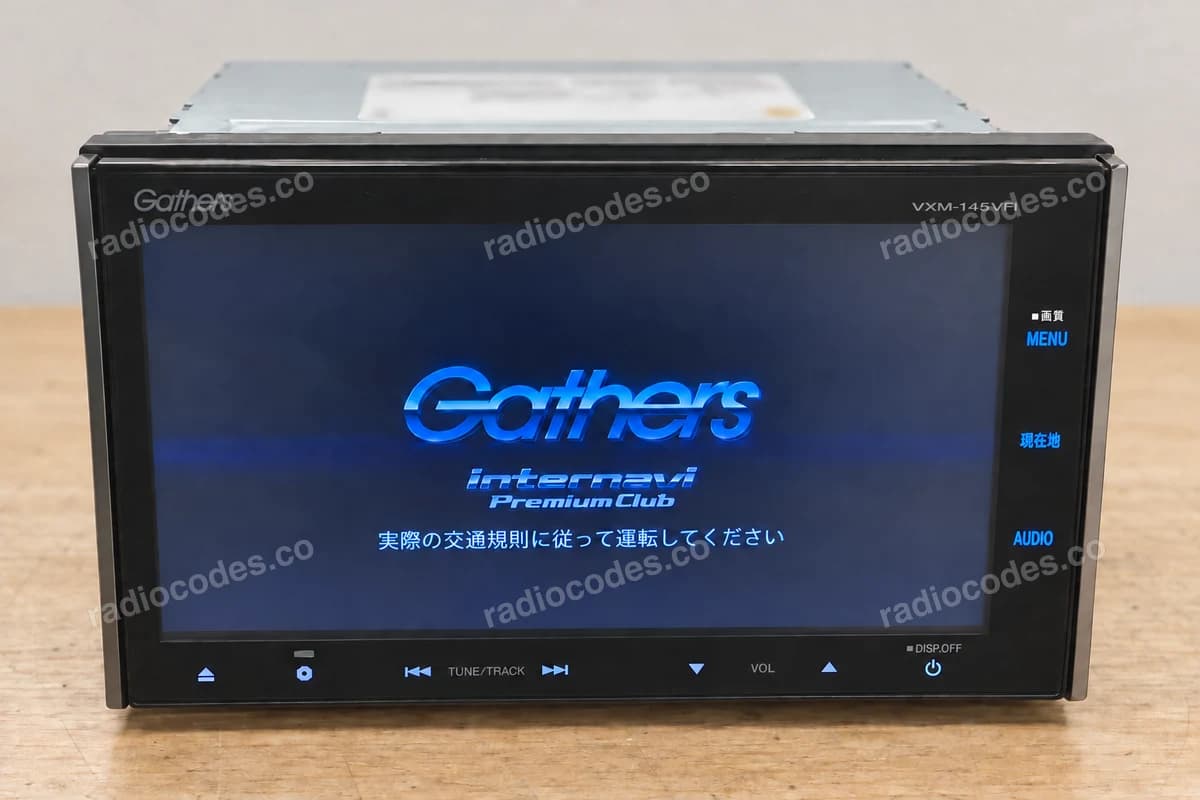
A Honda imported from Japan, a new battery, and now the radio shows a row of empty boxes, often with Japanese text? That is the anti-theft lock on a Gathers radio. You can't bypass it or reset it, but you can get the code back. All you need is the serial number from the radio's casing and a few minutes.
What is a Gathers radio?
Gathers is the audio and navigation brand of Honda Access, Honda's accessories division for the Japanese market. Instead of a factory head unit, many cars sold in Japan were fitted with a Gathers radio at the dealer. Used Japanese imports carry these units all over the world: from Zambia, Zimbabwe and Kenya to New Zealand, the Caribbean and Georgia. You will find them in the Fit (called the Jazz in Europe), Freed, Stepwgn, Vezel (the HR-V elsewhere), Fit Shuttle and N-WGN, and sometimes in cars where a previous owner swapped in a radio from another Honda.
The model name is printed on the front panel or the label, for example VXM-155VSi, VXM-175VFi or VXM-195VFNi. The part that matters for the code is the number: VXM-145, VXM-155 and so on.
Why does a Gathers radio ask for a code?
It is an anti-theft feature. Whenever the radio loses power, for example after a battery change, a flat battery, a pulled fuse or a move to another car, it locks and waits for its code. The code belongs to that specific radio, not to the car. There is no universal code that works for every Gathers unit or every Honda model.
Which Gathers models do we support?
We can get the code for VXM-145, VXM-155, VXM-165, VXM-175, VXM-185, VXM-195, VXM-205 and VXM-215, whatever the suffix (VSi, VFi, VFNi, C and others).
We do not support VXM-142, VXM-152, VXM-164, VXM-174, VXM-184, VXM-194 or VXM-204. These units were made by other manufacturers (JVCKENWOOD and Clarion) and use a different code system. We would rather tell you now than after you have paid.
Is your model on neither list? Send us a photo of the label showing the model name and serial number, and we will check it before you buy.
Where to find the serial number of a Gathers radio
Start with the car's paperwork. If the car came with a card for the radio, the serial number, and sometimes even the code itself, may be on it.
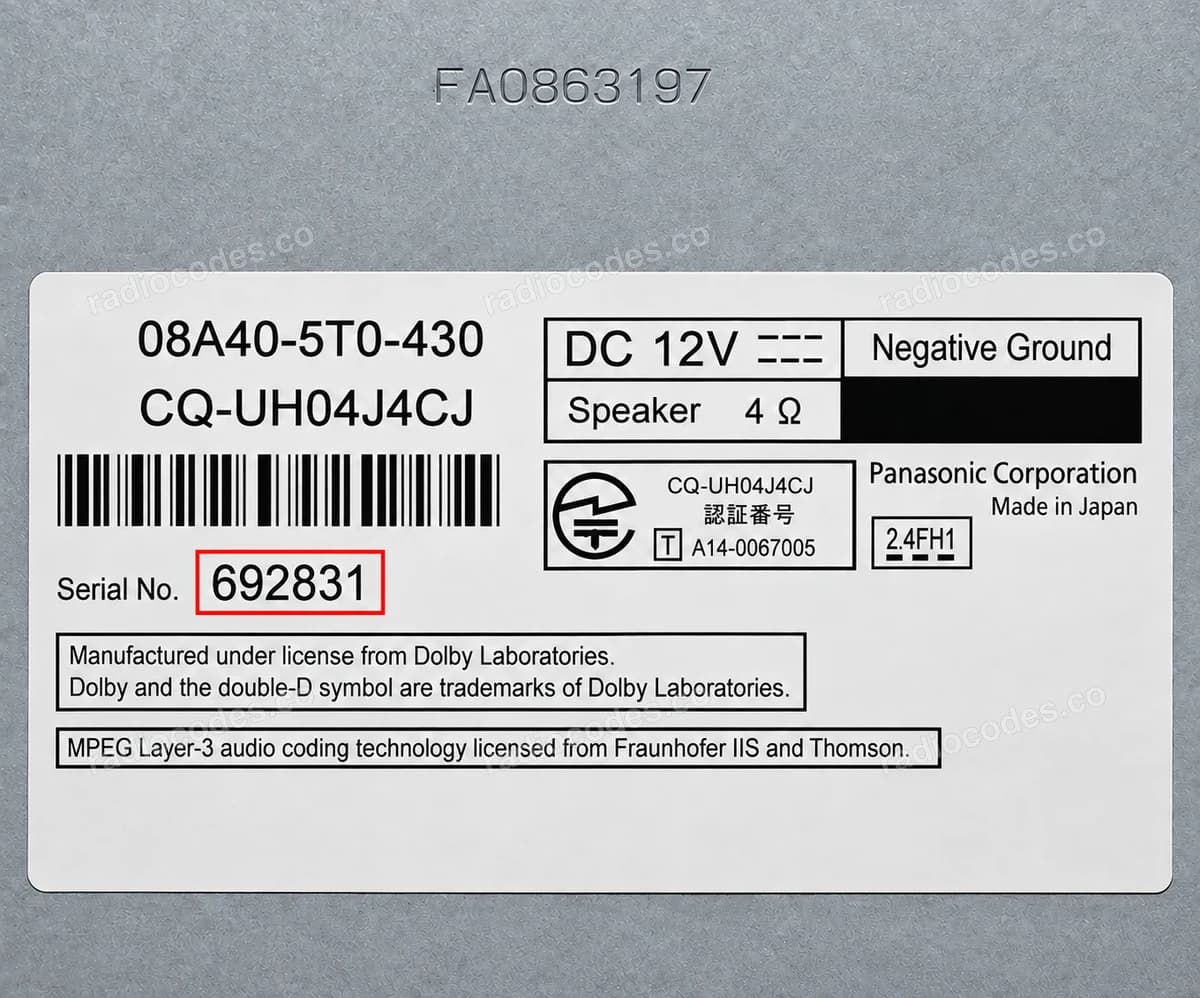
In most cases, though, you will need to read the number off the radio. It is on a white sticker on the top or side of the metal casing, usually next to a barcode. To see it, slide the radio out of the dashboard:
- Remove the plastic trim around the radio. Plastic pry tools will keep the dashboard free of scratches.
- Undo the screws holding the radio in place, usually four.
- Slide the radio out just far enough to see the sticker. There is no need to unplug anything.
- Take a sharp photo of the whole sticker and copy down the serial number.
Don't mix up the serial number with the Honda part number (for example 08A40-…) or with the VXM model name. Copy the serial exactly, without dropping any digits, leading zeros or letters. If you are not sure which number is the right one, a photo of the sticker settles it.
Can I use the VIN or ask a Honda dealer?
The VIN won't help here. Gathers radios were accessories fitted by dealers in Japan, so the code comes from the radio's serial number, not from the chassis number. For the same reason, a Honda dealer outside Japan often cannot look up the code for a Japanese unit. The serial number on the sticker is the most reliable route.
How to get your Gathers radio code online
- Open the Honda radio code form and type in the serial number from the sticker.
- Check the summary. You will see the price before you pay.
- Once you have paid, the code arrives by email within minutes, 24/7, nights and weekends included.
No dealer visit and no waiting for an answer from Japan. If we cannot retrieve your code, you get your money back. Get your Honda radio code.
How to enter the code on a Gathers radio
Depending on the model, you enter the code with the preset buttons or on the on-screen keypad. Each digit is one short press. For example, for the code 64131 you press 6, 4, 1, 3 and 1. Don't hold the buttons down and don't press anything between the digits. If the screen has a confirm button, tap it only after you have entered every digit.
The radio shows strange characters after a wrong code
After several failed attempts, a Gathers radio blocks code entry for a while. Instead of the code boxes, you will see a screen of unreadable characters. If that happens:
- turn the ignition to ON,
- don't touch any buttons or the screen for about 15 to 20 minutes,
- when the code boxes come back, enter the code again, calmly.
More attempts during the lockout only make the wait longer. If the radio rejects a code you entered correctly, compare the serial number with the sticker and send us a photo of the label.
What the code won't change: Japanese menus and FM band
It is worth knowing what the code doesn't do. It gets the radio working again, but it doesn't translate the Japanese menus or change the FM band. Japanese units receive roughly 76 to 90 MHz, so many local stations may be out of reach. Bluetooth, USB and CDs work normally as soon as the radio accepts the code. Whatever you plan to do next, the code is the first step.
Keep the code for next time
The code doesn't change after the next battery swap. Save it together with the serial number, in the car's paperwork or on your phone, and next time the radio will be back on in a minute.
Have a different Honda radio? Browse our Honda radio catalogue.
Radio asking for a code after a battery change?
Trusted by over 47,000 drivers
- 100% money-back guarantee
- Available 24/7
- No dealer visit needed