Nissan Radio Code: Qashqai, Juke, Micra & Navara (All Units)
Nissan radio locked after a battery change? Identify your unit (Daewoo, Clarion, Blaupunkt or Visteon), read the serial from the label or screen, and get the original code in minutes.
Article author
 Radiocodes.co team
Related reading
Skoda Radio Code: The Complete Guide (Swing, Bolero, Amundsen)
Locked Skoda radio after a battery change? Find the SKZ serial number on the unit's label and recover the original factory code in minutes — works for Swing, Bolero, Amundsen, Columbus and older units.
SAFE 2 on an Audi or VW Radio? What It Means and How to Fix It
SAFE 2 means the radio locked itself after two wrong code attempts. Leave it powered on for 30–60 minutes, then enter the correct code — here's how to recover yours from the serial number.
Volkswagen Radio Code: 5 Places to Find It (and What to Do If It's Lost)
Check the code card, service book and glovebox first — and if the code is gone, recover the original from the radio's serial number in minutes. A step-by-step VW guide.
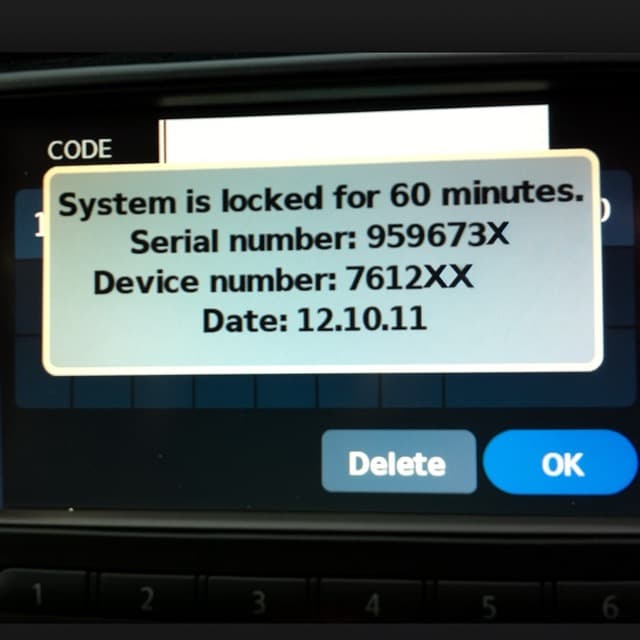
A Nissan stereo that asks for a code after a battery change is protecting itself against theft — and the code it wants is the one assigned to that exact unit at the factory. Nissan used several radio suppliers over the years, so the first step is identifying which unit you have. After that, recovery is quick.
Which radio is in your Nissan?
- Daewoo-built units (most Connect and LCN screens in the Qashqai, Juke and X-Trail): serial starts with DW or DS, printed on the label next to a part number beginning with 28185. Many of these can display the serial on screen — no removal needed.
- Clarion units (typical for the Micra and Note): look for a PN- part number and a serial such as CL0943… on the casing label.
- Blaupunkt-built units: 14-character serial starting with BP.
- Visteon units (Navara, Pathfinder and others): short serial like M117844 on the label; some screen units show it in the system information menu.
Where to find the serial number
If the screen route is not available, the serial sits on the sticker on the top or side of the head unit. Take a clear photo of the whole label — serial and part number together — before sliding the radio back in. Our order form shows exactly which identifier your unit needs, and per-model details are on the model pages: Qashqai, Juke, Micra, Navara and the full Nissan hub.
From serial to working radio in minutes
Enter the serial in the Nissan radio code recovery form and the original factory code arrives by e-mail, usually within minutes. It is the code your radio was born with — it will work again after every future battery disconnect, and every order carries a money-back guarantee.
Entering the code without locking the radio
Most Nissan units take a 4-digit code typed with the preset or numeric buttons and confirmed with OK/Enter. Type carefully: several wrong attempts put the radio into a timed lockout, and on some units the wait grows with every failed try. If that has already happened, leave the ignition and radio on until the unit accepts input again — usually 15 to 60 minutes — then enter the verified code once.
Radio swapped at some point?
Codes follow the radio, not the car. If a previous owner fitted a second-hand unit, any code found in the car's paperwork belongs to the old radio — always order with the serial read from the unit that is actually installed. When in doubt, use the label-photo option in the order form so the serial can be verified against the right unit.
Radio locked after a battery change?
Trusted by over 47,000 drivers
- 100% money-back guarantee
- Available 24/7
- No dealer visit needed